

· 4 min read
HTTP Content-Type: What is It & How to Check
We frequently deal with various types of web content. Haven't we all wondered about the process that goes behind ensuring this content is properly and correctly displayed in web browsers?
SEOmator's free bulk HTTP status checker traces up to 25 URLs at once. Each one is fetched from our servers and followed one hop at a time, so you see every status code in the chain — 301, 302, 404 — with the response headers and timing at each step. Ask as a browser or as Googlebot. No signup.
 Reviewed by Charles Duncan, Co-founder & CTO
Every URL you paste is fetched from our infrastructure with automatic redirect following switched off, then followed by hand, one hop at a time. That is what keeps the intermediate status codes visible: instead of a single final answer you get the whole chain, each hop carrying its own status, headers and timing. Six URLs are traced at a time, so a list of 25 never arrives at one origin as 25 simultaneous requests. Cookie values are stripped before anything reaches your screen — the cookie name is shown, the value never is.
One per line, up to 25 per check. http:// or https://, homepages or deep paths, mixed domains are fine. No account, nothing to install. Leave the scheme off and we assume https.
Requests go out as desktop Chrome by default. Switch to Googlebot, Bingbot, GPTBot or no User-Agent at all and run it again to see whether the server answers a crawler differently than it answers you.
Each row shows its status codes in the order they happened and how many redirects it took. Expand a row for the hop-by-hop detail: scheme, host, path, timing and the full response headers at every step.
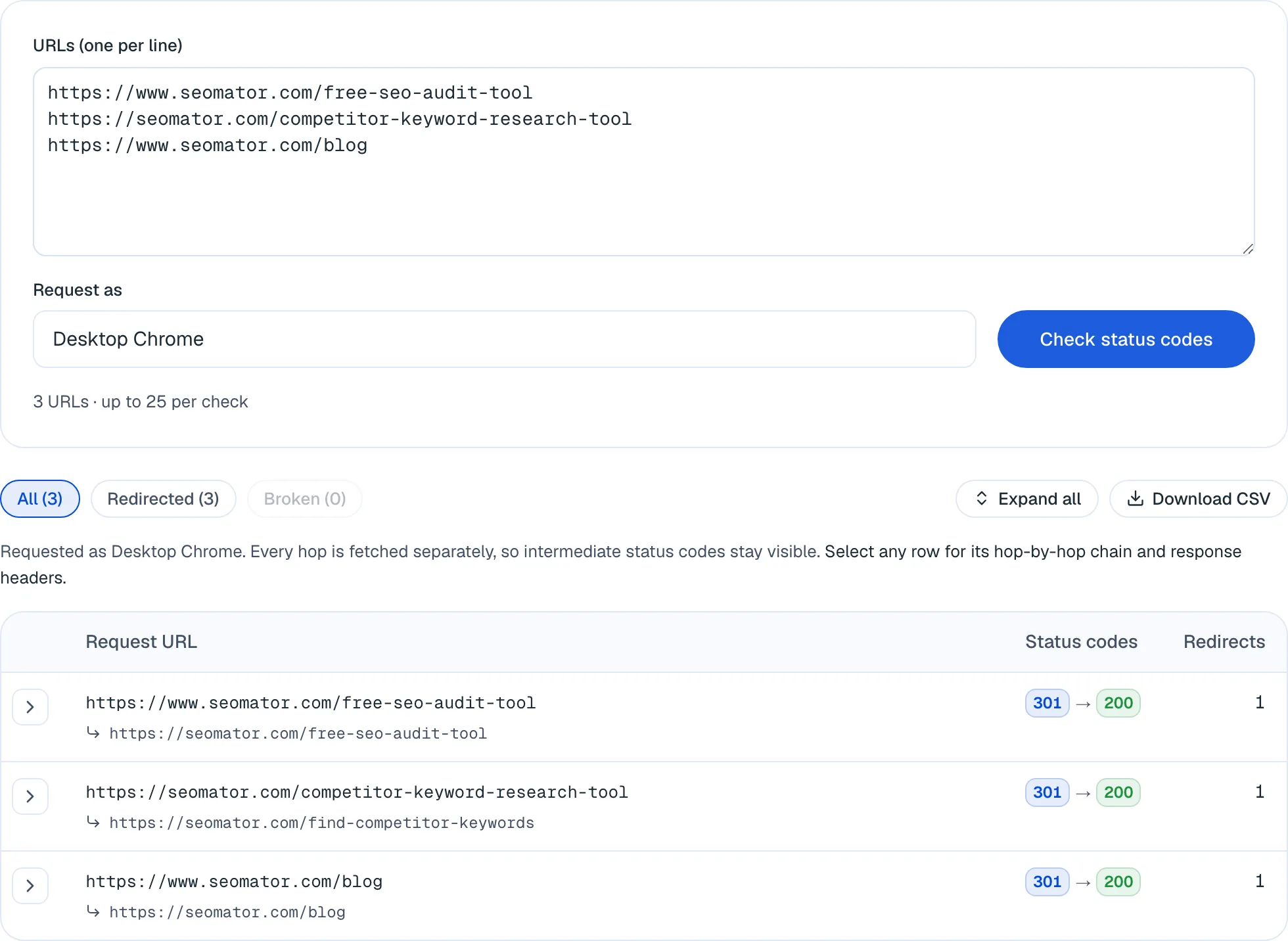
Everything in this grid works right now, no sign-up. The marked features unlock when you create a free SEOmator account.
Paste a whole column out of a migration sheet instead of working through it one URL at a time. Duplicates are dropped and six requests run at once, so no origin gets hammered.
A 301 → 302 → 200 chain shows as three badges in the order they happened. Anything that follows redirects for you collapses that into one 200 and destroys the evidence.
Switch the User-Agent and run it again. A server that answers crawlers differently from browsers stays invisible until you ask it both ways.
The complete block per hop, not a curated subset — Cache-Control, Content-Type, X-Robots-Tag, HSTS, CSP and whatever custom headers your stack adds.
Every request in the chain is timed on its own, so a chain that is slow because of one bad hop reads differently from one that is slow all the way through.
Narrow to just the redirected or just the broken rows and download exactly what you are looking at as CSV. Cookie values are redacted before anything is rendered or exported.
A full crawl checks the status code and security headers of your whole site against the audit engine's 251 rules, not one URL at a time.
Scheduled re-audits keep a record, so you can see when a page's status code or security headers changed — not just what they are today.
Pages that started returning 4xx, or redirect chains that appeared after a migration, surface in your dashboard instead of waiting to be noticed.
Twenty-five URLs is a spot check. Create a free SEOmator account to audit status codes and headers across every page, track changes over time, and get alerted when one breaks.
Sign up free Reviewed byCharles Duncan · Co-founder & CTO
I built the fetch layer this tool runs on, and the design decision that matters is that it never lets the HTTP client follow a redirect on its own. Each hop is requested deliberately and recorded before we move to the next one. The moment something follows a chain for you, it destroys the evidence: you see the 200 at the end and never the 302 that should not have been in the middle. Across the sites we audit, redirect chains of two or more hops show up on 24.3% of them, and a missing HSTS header is the fifth most common failure we find at 38.6% (H1 2026) — both invisible to anything that quietly resolves the chain. Two honest limitations. The crawler User-Agents are strings we send from a Cloudflare IP, so an origin that verifies crawlers by reverse DNS will correctly treat us as an impostor; a difference between the Chrome run and the Googlebot run is a strong signal worth chasing, not proof of what Google receives. And 25 URLs is a spot check — when you need every URL on the site, that is the full audit, not this.
 Charles Duncan · Co-founder & CTO
Across the sites we audit, redirect chains of two or more hops turn up on 24.3% of them (H1 2026). Most started as one sensible redirect that nobody re-checked after the next migration. In a list of 25, the rows showing two or three badges are your whole afternoon's work — go straight to them.
Run both variants of the same URL together, plus the www and non-www forms if you have them. You should see exactly one 301 landing on the canonical address. Two hops through a www variant first is crawl budget and link equity leaking on every single request.
Same list, two runs, compare the status columns. A row that is 200 for a browser and 403 or 302 for a crawler is a page that quietly does not exist in search. This is the check nobody does, and it is the reason the User-Agent picker is there.
A missing Strict-Transport-Security header is the fifth most common failure in our audit engine — 38.6% of sites (H1 2026). It costs one line of server config, and without it the first request of every session is still made in the clear before the redirect fires.
A page can be deindexed by a header no one can see in the markup. If a URL vanished from search but the HTML looks fine, check for X-Robots-Tag: noindex here first. I have watched teams rewrite good content for a month over a one-line header a staging config left behind.
Cache-Control, Content-Type and the security headers are the things a new CDN layer quietly rewrites. Check one representative URL per template the day the change ships, while you still remember what you touched.
When one page misbehaves and its siblings do not, run both and diff the header blocks. The difference is usually a single header, and it is usually the answer.
Every page you load arrives with a second, invisible document attached to it: the response headers. They are not part of the HTML, they never appear on screen, and they carry decisions that override almost everything the markup says.
A page can be perfectly written, correctly linked and beautifully rendered, and still be excluded from search because a single header said so. It can be served with the wrong content type and displayed as raw source. It can be cached by an intermediary for a month after you fixed it. It can quietly redirect somewhere you never intended. In all four cases the HTML looks healthy, which is exactly why these problems survive so long — the evidence is somewhere nobody thought to look.
Checking headers is how you separate a content problem from a plumbing problem. It usually takes about a second, and it is the first thing worth doing when a page behaves in a way its source code does not explain.
Your browser follows redirects automatically. So does most tooling. That is the correct default for browsing and the wrong default for diagnosis, because automatic following destroys the thing you came to inspect: you end up looking at the 200 OK at the end of the chain, with no indication that a 302 you never authorised sat in front of it.
This checker switches automatic following off and then walks the chain deliberately, one request at a time. Each hop is recorded before the next one goes out, so a URL that travels 301 → 302 → 200 shows all three in order, each with its own status, its own Location target, its own timing and its own full set of response headers. Nothing collapses into a single final answer.
Before you read a single header, read the number. It tells you which category of problem you have.
| Range | Meaning | What it usually means for you |
|---|---|---|
2xx | Success | The server returned content. 200 is the normal case; 204 means success with no body. |
3xx | Redirection | The URL is pointing elsewhere. 301/308 permanent, 302/303/307 temporary. |
4xx | Client error | The request was rejected. 404 not found, 403 forbidden, 410 deliberately gone, 429 rate-limited. |
5xx | Server error | The server broke. 500 generic failure, 502/504 an upstream or gateway problem, 503 unavailable. |
Two distinctions inside those ranges do real damage when they are wrong.
301 versus 302. A permanent redirect tells search engines to transfer the old URL's signals to the new one and update their index. A temporary redirect tells them to keep the old URL and treat the new location as a detour. Teams routinely ship a 302 for a permanent move because the framework default happened to be 302, and then wonder why the new URL never inherits anything.
404 versus 410. Both mean the page is not there. 410 Gone states that the absence is deliberate and permanent, and crawlers act on it faster. If you have retired a section on purpose, 410 is the more honest answer.
403 deserves special mention. Some servers reject any client they do not recognise. That is why this tool sends a standard desktop Chrome User-Agent by default rather than announcing itself — an unfamiliar agent gets a 403 on a fair number of hosts, and a 403 that only exists because of who asked is a misleading diagnosis. It is also why the User-Agent is selectable: a 403 that appears only when you ask as Googlebot is not noise, it is the finding.
Across the sites we monitor for crawler traffic, the share of bot requests answered with a 2xx fell below half in 2026 — around 47% in January and 46.7% by July — while roughly a third of all crawler requests were rejected outright with a 4xx (about 36% across the same period). Redirects made up a rising slice: 13.9% of crawler responses in January 2026, 15.0% by July.
That upward drift is worth sitting with. Every redirect served to a crawler is a request that fetched no content. A handful is unavoidable. A pattern of them, especially on URLs you actively want indexed, is a slow tax on how much of your site gets seen.
A redirect chain is what happens when a redirect points at another redirect. http://example.com sends you to https://example.com, which sends you to https://www.example.com, which sends you to https://www.example.com/. Four requests to serve one page.
Across the sites we audit, chains of two or more hops appear on 24.3% of them (H1 2026) — it is the tenth most common failure our audit engine finds, and the defining issue in the Redirects category, which fails on 24.3% of audited sites overall.
Almost none of these were built on purpose. They accumulate:
http → https.www. Rule two: non-www → www./blog/post to /resources/post. Rule four.Each rule was correct in isolation, and nobody ever re-tested the combination. The cost is real but undramatic, which is why it persists: every hop is an extra round trip for users, an extra request against crawl budget, and — depending on which search engine and which day you ask — a possible attenuation of the link equity being passed along.
Check the entry URLs, not the destinations. Paste the versions people actually link to — the http:// one, the non-www one, the one with the trailing slash — and let the tool walk each chain for you. The Redirects column is the one to read first: any row above 1 is a chain, and the status badges show you the exact sequence that produced it.
For a list of any size, filter to Redirected and sort your attention by that column. In a typical migration sheet the chains cluster — the same misordered rule set produces the same extra hop across a whole section of the site, so fixing one rule usually clears twenty rows at once.
Security headers are instructions to the browser about how much to trust the connection and the content. They cost a line or two of server configuration and they are, collectively, the most neglected part of the response.
Missing Strict-Transport-Security is the fifth most common individual failure our audit engine finds: 38.6% of audited sites (H1 2026). The Security category as a whole fails on 44.1% of sites.
| Header | What it does |
|---|---|
Strict-Transport-Security | Tells the browser to use HTTPS for this host for a set period, without asking. Removes the insecure first request. |
Content-Security-Policy | Restricts which sources scripts, styles and frames may load from. The strongest defence against injected content. |
X-Content-Type-Options: nosniff | Stops the browser guessing a file's type when the declared one looks wrong. |
X-Frame-Options | Controls whether other sites may embed yours in a frame. Clickjacking protection. |
Referrer-Policy | Decides how much of the current URL is passed on when a visitor clicks away. |
Without HSTS, a visitor who types your domain without a scheme makes their first request over plain HTTP. Your 301 to HTTPS fixes it immediately — but only after that first unencrypted request has already been sent. HSTS closes that window: after the first successful visit, the browser upgrades the URL itself before anything leaves the machine.
The reason it goes missing is mundane. It is not a code change, it lives in server or CDN configuration, and it belongs to nobody in particular. Check for it here, and if it is absent, it is usually a one-line fix that stays fixed.
A missing header cannot be seen — it simply does not appear in the table. It is worth knowing which headers you expect before you look, or you will read a clean-looking result as a passing grade.
This is the category that costs the most traffic per incident, because the symptom is total and the cause is invisible.
X-Robots-TagX-Robots-Tag does everything the <meta name="robots"> tag does, but from the header, where no amount of reading the page source will reveal it:
X-Robots-Tag: noindex, nofollow
A page carrying that will be dropped from the index while its HTML remains flawless. The classic origin is a staging or pre-production configuration that shipped to production with everything else. If a URL has disappeared from search and the content looks fine, check this header before you change a word.
Unlike the meta tag, it also applies to non-HTML files — PDFs, images, feeds — which is the only way to control indexing for those at all.
Link: rel="canonical"Canonicals can be declared in the header as well as in the HTML:
Link: <https://example.com/page>; rel="canonical"
If both exist and disagree, you have a conflict that search engines resolve at their discretion rather than yours. Worth checking whenever a canonical is not behaving as expected.
Content-TypeWrong content types break rendering in ways that look like content bugs. A page sent as text/plain is displayed as source rather than rendered. A missing charset produces mangled characters in some locales and not others. Neither is visible in the markup, because the markup is fine.
Three headers govern whether a client — browser, CDN or crawler — needs to fetch your page again at all.
Cache-Control sets the caching rules: max-age in seconds, no-store to forbid caching entirely, private to limit it to the end user's browser. It is the header most likely to be silently rewritten by a CDN placed in front of your origin, which is why it is worth re-checking after any change to that layer.ETag is a fingerprint of the response body. If it has not changed, neither has the content.Last-Modified states when the resource last changed. Crawlers pair it with If-Modified-Since and skip the download when the answer is "not since then".The common failure here is Last-Modified that updates on every request — typically because it is generated from the current time rather than the content's actual edit date. Every conditional request then returns a full 200 with the whole body instead of a cheap 304 Not Modified. Nothing breaks, and you spend crawl budget re-downloading pages that never changed.
The results table has one row per URL and three columns worth reading in order.
Status codes shows the whole chain as a sequence of badges, left to right, in the order the requests actually happened. Green is 2xx, blue is 3xx, orange is 4xx, red is 5xx. A single green badge is a clean direct hit. Three badges ending in green is a working page that costs three round trips to reach. Anything ending in orange or red is a URL that does not resolve.
Redirects is the hop count. Sort your attention by it. Zero is ideal, one is normal and correct, two or more is the 24.3% problem above.
Expanding a row gives you the chain in detail: a summary table with each hop's scheme (with an open padlock on any http:// step, which is worth noticing), host, path and timing, followed by the complete response headers from every single hop. Two things to know about how those render:
Set-Cookie values are redacted. You will see the cookie's name and [redacted] in place of its contents. The tool will not reflect a session token back through a page.A crawler User-Agent is a claim, not an identity. When you select Googlebot, we send Googlebot's User-Agent string — from our own infrastructure. Any site that verifies crawlers by reverse DNS lookup will correctly conclude we are not Google, and may answer accordingly. So a difference between the Chrome run and the Googlebot run is a strong signal that something is treating crawlers specially, and worth chasing; it is not proof of what Googlebot receives.
Twenty-five URLs is a spot check. It is the right size for a migration sample, a template sweep or a post-deploy sanity check. It is not a site crawl. When the question is "every URL on the site", that is the free SEO audit.
Two methods worth knowing, because you will not always have a browser tab free.
curl is the fastest route on any machine with a terminal. -I sends a HEAD request and prints only the headers:
curl -I https://example.com
Add -L to follow redirects and print every hop in sequence, which is the closest single-URL equivalent to what this tool does:
curl -sIL https://example.com | grep -E "HTTP/|location:"
Add -A to ask as somebody else — the terminal version of the User-Agent picker:
curl -sIL -A "Googlebot/2.1 (+http://www.google.com/bot.html)" https://example.com
Chrome DevTools works without leaving the page. Open DevTools, select the Network tab, reload, click the top request, and read the Response Headers panel. The catch is the one described earlier: the browser follows redirects for you, so on a redirected URL you land on the final response and have to hunt back through the request list for the 301 that started it. Ticking "Preserve log" before you reload makes that hunt considerably easier.
Both are excellent, and both are one URL at a time. This tool exists for the case where you have a list rather than a URL, where you want every hop laid out side by side without writing a loop, and where you want to hand somebody a result they can read.
A status check answers a narrow question very well. When the answer points at something larger:
robots.txt actually allows → robots.txt testerA client just migrated. Paste the redirect map straight out of the spreadsheet, filter to the rows with more than one hop, and hand back a CSV of exactly what needs fixing before the traffic report finds it for you.
A set of money pages dropped out of the index and the content looks fine. Run them together as Googlebot, then check the status codes and X-Robots-Tag before you touch a word of the copy.
You shipped a reverse-proxy or CDN change. Run one URL per template in a single pass and compare Cache-Control, Content-Type and the security headers while the deploy is still fresh in your head.
Redirects are followed one deliberate hop at a time, so every intermediate status stays on screen instead of collapsing into whatever the browser finally landed on.
A migration is a list, not a URL. Check the list, then filter it down to the rows that are actually broken.
Googlebot, Bingbot, GPTBot, ClaudeBot, PerplexityBot — or no User-Agent at all, which is a surprisingly common way to trip a WAF.
The full table and every header renders on the page, and the CSV downloads without an email address.
Set-Cookie values are redacted before rendering. We show that a cookie was set and what it is called, never its contents.
Trace a single chain in isolation with the redirect checker, or run all 251 rules across the whole site with the free SEO audit.
An HTTP response header is a piece of information sent by a server in response to a client's request. It contains metadata about the response, such as the type of content being returned, the server's status code, and caching instructions. Headers travel with every response, are invisible in the page itself, and can change how a page is cached, rendered, secured, or indexed without a single character of the HTML changing.
Headers carry decisions that the visible page cannot show you. A page can be blocked from search by an X-Robots-Tag header, served as the wrong content type, cached for a month by accident, or redirected somewhere unintended — and in every one of those cases the HTML looks perfectly healthy. Checking headers is how you tell a content problem apart from a server problem.
Twenty-five per check, one per line. Duplicate lines are dropped before anything is requested, and six URLs are traced at a time so a long list never lands on one server as twenty-five simultaneous requests. If you paste more than twenty-five, the extras are skipped and the tool tells you how many it left out rather than silently truncating your list.
Yes, but manually, one hop at a time — which is the opposite of what a browser does. Automatic redirect following is switched off, so each response is captured with its own status code, headers and timing before the next request goes out. A URL that goes 301 → 302 → 200 shows all three, in order, instead of collapsing into the final 200. Chains are followed up to ten hops; past that we stop and flag it as a probable loop.
You can send Googlebot's User-Agent string, along with Bingbot, GPTBot, ChatGPT-User, ClaudeBot, PerplexityBot, iPhone Safari, or no User-Agent at all. Run your list as a browser, then again as a crawler, and compare the status columns. Be aware of what this does and does not prove: we send the UA string from our own infrastructure, so a site that verifies crawlers by reverse DNS lookup will correctly identify us as not being Google. A difference between the two runs is a strong signal worth investigating, not proof of what Googlebot receives.
Yes — the Download CSV button exports whatever the table is currently showing, so if you have filtered down to just the redirected or just the broken rows, that is what you get. Each row carries the request URL, the full status chain, the redirect count, the final status, the final URL and any error. It opens straight in a spreadsheet next to the redirect map you were checking against.
Paste the URLs above, expand any row, and read the header table for Strict-Transport-Security (HSTS), Content-Security-Policy, X-Content-Type-Options, X-Frame-Options and Referrer-Policy. Missing HSTS is the single most common security failure we see — 38.6% of the sites run through our audit engine lack it (H1 2026). A missing header simply will not appear in the table, so it is worth knowing which ones you expect before you look.
Open DevTools, go to the Network tab, reload the page, click the top request and read the Response Headers panel. It works well, with two catches: the browser follows redirects automatically, so a redirected URL lands you on the final response and you have to dig back through the request list to find the 301 that started it — and you can only do it one URL at a time. This tool records each hop as a separate row and does twenty-five URLs in one pass.
There is no such thing as an HTTPS header. Headers are part of HTTP, the protocol; HTTPS is the same protocol carried over a TLS-encrypted connection. The headers themselves are identical either way. What does differ is that a site served over HTTPS can send security headers that only make sense there — Strict-Transport-Security in particular, which tells the browser never to use the insecure version again.
Something between the visitor and your content is rewriting the request. The usual suspects are an http-to-https rule, a www-to-non-www rule (or the reverse), a trailing-slash normalisation, or a rule left behind by an old migration. Check the Location value in the result: it names exactly where the redirect points, which is normally enough to identify which rule fired.
The Content-Type header specifies the type of content being returned, such as text/html, application/json, or image/jpeg. It also usually carries a charset. Getting it wrong is more consequential than it sounds — a page served as text/plain will be displayed as source code rather than rendered, and search engines will treat it accordingly.
The Content-Length header specifies the size of the response body in bytes. It is often absent on pages sent with chunked transfer encoding or compression, which is normal and not a fault.
The Server header identifies the software and version of the server that generated the response, for example nginx or cloudflare. Many operators deliberately trim or remove it, since advertising an exact version number mainly helps people scanning for known vulnerabilities.
The Date header indicates the date and time when the response was sent. It reflects the moment the response was generated, not when the page was last edited — that is Last-Modified.
The Last-Modified header specifies the date and time when the resource was last modified. Crawlers use it together with If-Modified-Since to skip re-downloading pages that have not changed, so a Last-Modified value that updates on every request quietly wastes crawl budget.
The Cache-Control header specifies caching instructions for the client, such as whether the response can be cached and for how long. It is the header most likely to be rewritten by a CDN sitting in front of your origin, which is why it is worth re-checking after any change to that layer.
Deeper reading from the SEOmator blog on what this tool measures.
· 4 min read
We frequently deal with various types of web content. Haven't we all wondered about the process that goes behind ensuring this content is properly and correctly displayed in web browsers?
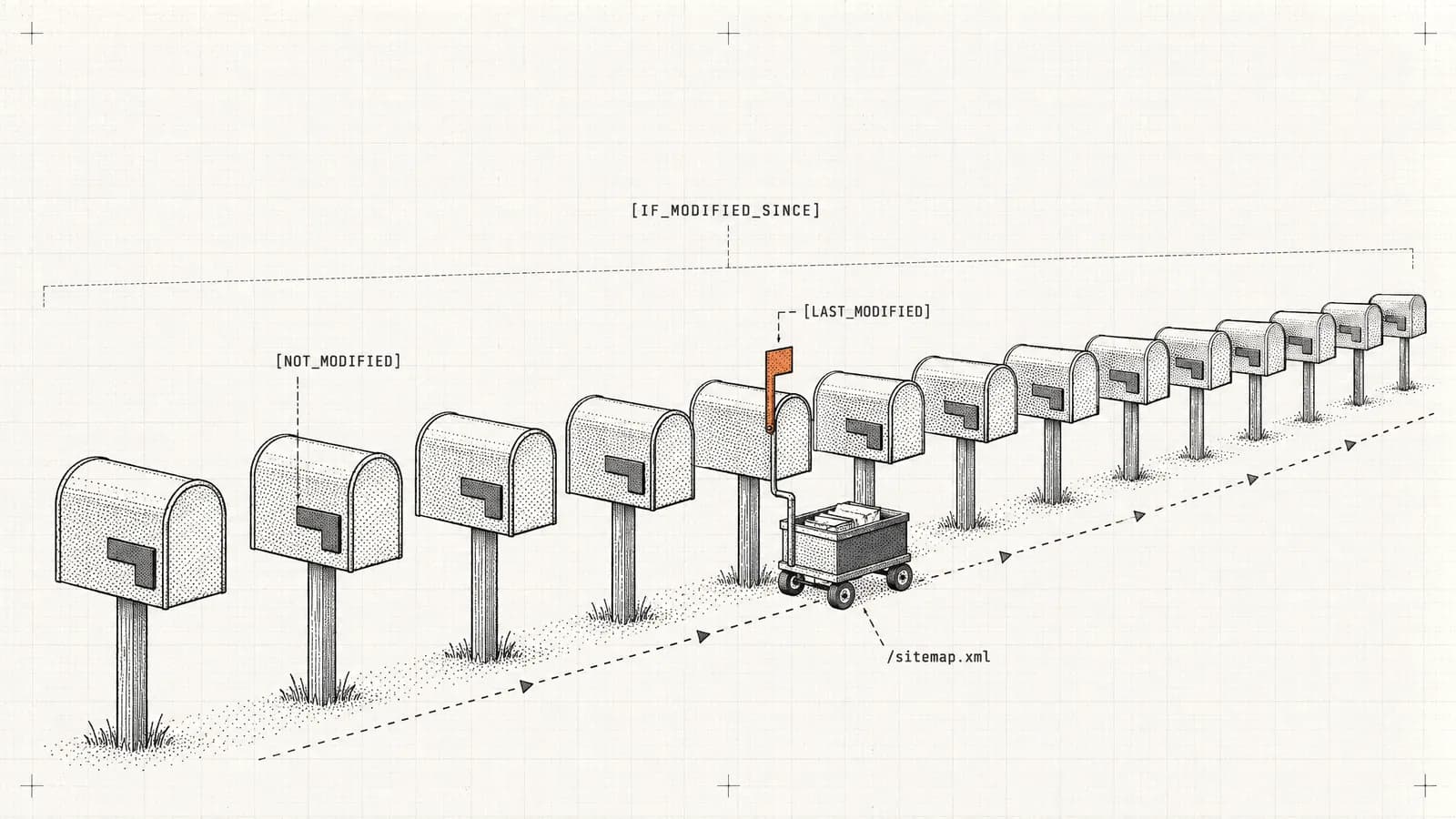
I've seen websites cut server response times by 40% and improve crawl efficiency dramatically—all by implementing two simple HTTP headers correctly. Here's exactly how If-Modified-Since and Last-Modified work, and why they matter more than ever for SEO.

· 7 min read
Imagine you're an artist. Would you be happy to find your artwork showcased in someone else's gallery without your consent, where no one can place you as the legitimate painter?
Elevate your online presence with our tool: Get found, Get ahead


