Free AI SEO Assistant: Chat With 10 Live SEO Data Tools

The free AI SEO Assistant is a specialist, not a general chatbot: it runs on SEOmator's own SEO playbook, built over 10 years of search work, and pulls live numbers mid-conversation — the live Google results page, keyword volumes and difficulty, backlinks, traffic estimates, AI Overview citations and any site's Domain Rating. No signup, no history kept — ask below.

Ben KaiserReviewed by Ben Kaiser, Principal Software Engineer

How can I help with your SEO?

Ask about keywords, rankings, content, or AI-search visibility — I can pull live data to back it up.

Guided workflows · tap to run

Live data tools · tap to try

SEOmator AI can make mistakes. Verify important data before acting on it.

How does the AI SEO Assistant work?

Under the hood the chat runs on Kimi K2.7 on Cloudflare Workers AI, but the SEO judgment is not the model's own: its operating instructions are SEOmator's playbook, built over 10 years of search work, which tells it to read intent first, then trust and entity health, then topical authority, then the tactic. When a question turns on a real number, it calls one of ten live tools instead of answering from memory — the live Google results page, keyword metrics, backlink and traffic data and AI Overview citations from SEOmator's own data network, Domain Rating from Ahrefs' public API — and it can chain up to eight of those calls in a single turn before it answers. Five of those chains are packaged as named workflows you can run in one tap, and every keyword and SERP tool can be pointed at the US or German market.

  1. Ask in plain language

    Type your SEO or GEO question the way you would ask a colleague. No prompt engineering, no account, no setup.

  2. It fetches the live numbers

    Name a keyword, a domain, or a brand and the assistant calls the matching tool rather than guessing from training data. Give it only a brand name and it resolves the domain first, then looks the domain up.

  3. You get data plus the decision

    Metrics come back as their own data cards, followed by what to actually do about them, prioritized by effort against impact. Every pull ends in a recommendation, not a data dump.

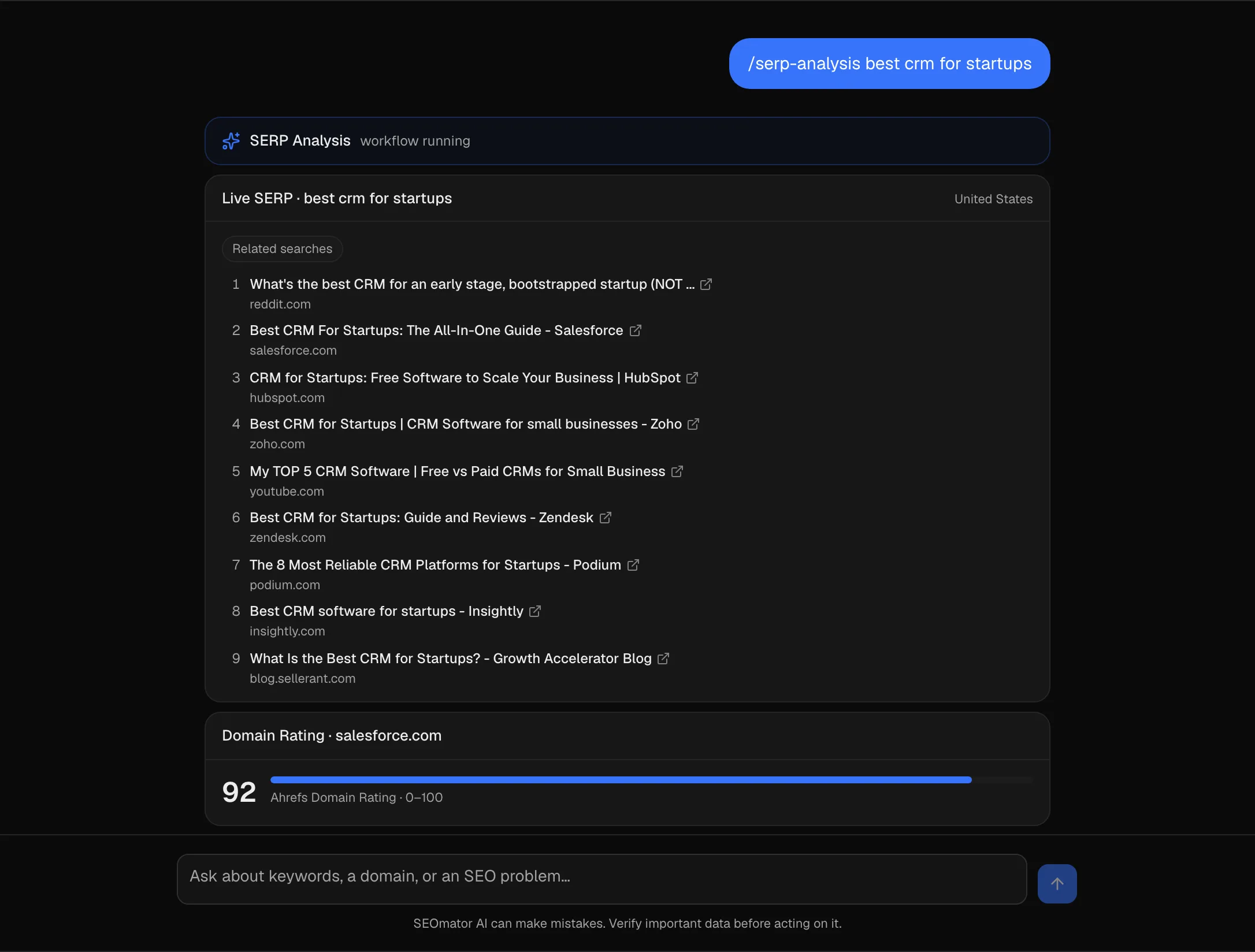
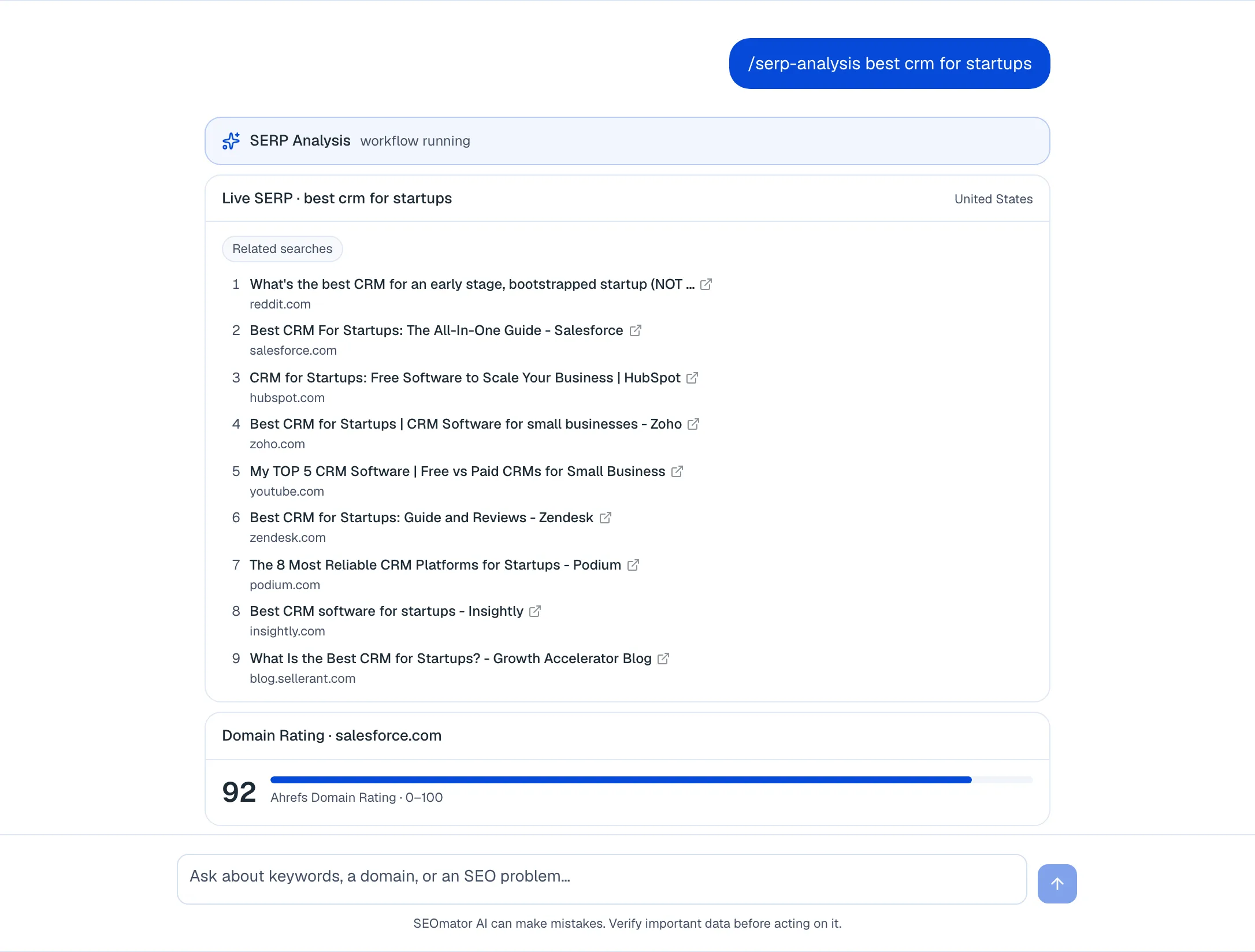
The AI SEO Assistant running the SERP Analysis workflow for "best crm for startups": a workflow banner, a live Google results card listing nine ranked domains with a Related searches badge, and a Domain Rating card below it showing 92 for salesforce.comThe AI SEO Assistant running the SERP Analysis workflow for "best crm for startups": a workflow banner, a live Google results card listing nine ranked domains with a Related searches badge, and a Domain Rating card below it showing 92 for salesforce.com
A real run against the live assistant (10 August 2026): the /serp-analysis workflow pulls the Google results page, then reads the authority of the top domains. The SERP shown is the one Google returned that day.

What features are free, and what does an account add?

Everything in this grid works right now, no sign-up. The marked features unlock when you create a free SEOmator account.

The live results page

Ask what ranks for a query and it pulls Google right now — the ranked results, the domains behind them, and whichever features are showing. Same call answers "where do I rank?".

Live keyword research

Give it a seed keyword and get up to 25 related terms with monthly search volume, competition level, CPC, keyword difficulty, and search intent.

AI Overview visibility

Name a domain and see the queries where it already appears as a Google AI Overview citation, with search volume and position for each.

Ahrefs Domain Rating

Pull any domain's 0-100 backlink authority score to size up a competitor before you decide whether the keyword is winnable.

Backlinks, traffic and competitors

Top-line link profile (referring domains, nofollow share, spam score), modelled organic traffic and its value, and the domains ranking for the same keywords.

Guided workflows

Five one-tap playbooks — SERP analysis, rank check, keyword research, competitor teardown, AI visibility audit. Each runs a fixed sequence and ends in a decision, not a data dump.

Chained tool calls

Up to eight tool calls per turn, so one question like "how is Notion doing in AI search?" becomes a lookup, a citation check, and an authority read before the answer.

Nothing stored

No account, no history, no conversation log on our side. Close the tab and the session is gone.

Free account

Rank history and trends

Positions tracked over time, so you see whether you are climbing or slipping instead of only where you stand today.

Free account

Prompt and ranking alerts

Get notified when a tracked keyword moves or your brand's share of AI answers shifts, instead of re-checking by hand.

Free account

Full site audits

Complete technical audits across your whole site, with issues prioritized by impact — the crawl the assistant deliberately does not do.

Create a free SEOmator account to unlock rank history, alerts, and full site audits.

Sign up free

Expert review of the AI SEO Assistant

Ben KaiserReviewed byBen Kaiser · Principal Software Engineer

I build front-end products at Microsoft and write about AI-first application development, so I came at this as an engineer rather than as an SEO. The thing worth checking in anything calling itself an AI assistant is whether it genuinely calls a tool or just produces a confident-looking number, and this one calls. Ask it for a domain's AI Overview keywords and you get a real lookup; give it something that breaks the query and it tells you the lookup failed instead of filling the gap with a plausible figure. That is the design decision most chat wrappers get wrong. The honest limitations: the keyword and AI Overview data is United States and English only, and it keeps no memory between sessions — so it is a fast research tool, not something you hand a long project to.

View Ben's profile

How does our expert use this tool?

Ben KaiserBen Kaiser · Principal Software Engineer
  1. Baseline your AI Overview footprint before anything else

    Across the sites SEOmator tracks, 27.4% of keywords showed a Google AI Overview in July 2026, up from 18.9% in January. Before you plan any GEO work, hand the assistant your domain and ask which keywords already cite you. That list is your starting line, in real numbers.

  2. Fix the top 20 before you chase citations

    In the prompt sets SEOmator tracks, 91.3% of Google AI Overview citations in H1 2026 went to pages already ranking in the organic top 20. If a page sits at 34, GEO tactics are not its problem. Ask the assistant for the keyword's difficulty and the competitor's Domain Rating, and fix the ranking first.

  3. Test how people ask, not just what you are called

    Across SEOmator's tracked prompt sets, brands are mentioned in 92-97% of prompts that name them, but only 11-18% of discovery prompts that describe a need without naming anyone. Ask the assistant for keywords by intent, then check whether you appear for the describe-the-problem phrasings, not only your own name.

  4. Hand it a brand name and let it chain

    You do not need the URL. Type a company name and the assistant resolves the domain, pulls its AI Overview keywords, and reads its Domain Rating in one turn — the fastest competitor snapshot on the site.

  5. Read Domain Rating as a comparison, not a verdict

    DR is Ahrefs' model of link strength, not Google's. It is useful for ranking three competitors against each other and useless as an absolute score. Ask for a competitor's DR next to yours, never on its own.

  6. State your market in the prompt

    Keyword and SERP lookups run against the United States or Germany. Ask in German or about a .de domain and it switches by itself; ask about any other market and it will name which of the two it used rather than passing those numbers off as yours.

On this page
  1. 01What is the SEOmator AI SEO Assistant?
  2. 02Which prompts pull live data?
  3. 03Why AI visibility now matters more than a top ranking
  4. 04What the assistant checks under the hood
  5. 05What to actually optimize for in AI search
  1. What is the SEOmator AI SEO Assistant?

    The SEOmator AI SEO Assistant is a free chat that answers SEO and GEO questions and pulls live data into the conversation: the live Google results page, keyword metrics, a domain's ranking keywords, backlink and traffic figures, organic competitors, Google AI Overview citations, and Ahrefs Domain Rating. It runs on the Kimi K2.7 model on Cloudflare Workers AI, and every data answer comes from a live source (SEOmator's own data network and Google), not from the model's memory. It works in your browser, needs no signup, and keeps no history. Close the tab and the conversation is gone.

    Ask it a question the way you would ask a colleague. When your question gives it something concrete to work with, such as a keyword, a domain, or a brand, it calls a tool and answers from real numbers instead of guessing. When it is a strategy question, it answers directly.

    It is a research and planning assistant, not a full-site crawler. For a complete technical scan, use the free SEO Audit tool. For position tracking over time, use the Rank Tracker. The assistant is where you think out loud and pull quick numbers.

  2. Which prompts pull live data?

    Ten of the assistant's answers come from live tools rather than the model. Give it the concrete input in the middle column and it fetches real figures.

    Ask forGive itYou get back
    What ranks right nowa search querythe live Google results page: ranked results, plus any answer box, People Also Ask, knowledge panel or AI Overview showing for it
    Where you ranka keyword and a domainthe domain's position in that live result set, or an honest "not in the top 10"
    What people typea partial queryGoogle's live autocomplete suggestions for it
    Keyword ideasa seed keywordup to 25 related keywords with search volume, competition, CPC, difficulty, and intent
    A site's keyword footprinta domainthe keywords it currently ranks for, with position, volume, and landing URL
    AI Overview visibilitya domainkeywords where that domain already appears in Google AI Overviews, with volume and rank
    How strong a site isa domainits Ahrefs Domain Rating, a 0–100 read on backlink authority
    Link profile shapea domaintotal backlinks, referring domains, the dofollow/nofollow split, referring IPs, broken links, spam score
    Traffic and valuea domainestimated monthly organic visits, ranking keyword count, traffic value, and the position spread
    Who you compete witha domainthe domains ranking for the same keywords, with shared-keyword counts

    Prompts that work well:

    • "What's ranking for best crm for startups right now, and what does the SERP want?"
    • "Is example.com ranking for seo audit tool?"
    • "Find keyword ideas for project management software and show search volume and difficulty."
    • "Summarise the backlink profile and organic traffic of ahrefs.com."
    • "Which keywords does notion.so already rank for in Google AI Overviews?"

    Five workflows are packaged as one-tap commands. Type / in the message box, or tap a card, and the assistant loads a full playbook before it starts: /serp-analysis, /rank-check, /keyword-research, /competitor-teardown, and /ai-visibility-audit. A teardown, for example, resolves the brand, then pulls authority, traffic, ranking keywords and link profile, then reports three exploitable gaps rather than four tables.

    It chains tools up to eight hops in a single turn. Give it a brand name and nothing else and it resolves the name to a domain, then pulls what it needs before it answers, rather than asking you for the URL first.

    Ask in German, or about a .de domain, and it switches markets. Keyword and SERP lookups run against either the United States or Germany, and the assistant names which market a number came from.

    Everything else, from content structure to on-page fixes to how to earn a citation, it answers from the model directly. When a tool fails or a query returns nothing, it tells you, rather than inventing a number.

  3. Why AI visibility now matters more than a top ranking

    Ranking in the blue links and getting cited in an AI answer have become two different games, and the traffic math is the reason. AI assistants read enormous amounts of the web and send almost none of it back as clicks.

    In the 28 days to mid-July 2026, Cloudflare Radar measured the crawl-to-referral ratio for the major AI operators. Anthropic fetched roughly 2,300 pages for every one visit it sent back. OpenAI and Perplexity ran around 210 to 225 pages per referral. Google sat near 5 to one. The AI crawlers take your content to build an answer; they rarely hand you the click. So the unit of visibility moves from "did someone click my link" to "did the answer cite me."

    That crawling is constant and identifiable. Over the same window, Radar's AI-bot traffic was led by ClaudeBot (about 19%) and GPTBot (about 10%), alongside Google's and Bing's crawlers. Of all AI crawling, roughly 47% was for model training and 11% explicitly for search, with a further 39% mixed. A real and growing share feeds the answers users see today, not only tomorrow's models.

    Two things follow, and the assistant helps with both:

    • See where you already show up. Ask it for a domain's AI Overview keywords to find which queries surface you in Google's AI answers. That is your current AI footprint, in real numbers.
    • Keep the citation bots able to reach you. GPTBot and ClaudeBot are the AI agents that websites most often name in their robots.txt files (Cloudflare Radar). Blocking a training bot is a fair choice, but accidentally blocking the search bot quietly removes you from citations. Confirm your rules allow OAI-SearchBot, PerplexityBot, and Claude-SearchBot.

    Source: Cloudflare Radar, radar/ai/bots and radar/bots/crawlers (radar.cloudflare.com), 28 days to 2026-07-19. These figures shift daily; read them as direction, not fixed values.

  4. What the assistant checks under the hood

    Each live answer maps to a specific, named source, so you can trust the number or go check it yourself.

    • The live results page is a real-time Google query: the ranked results, the domains behind them, and whichever SERP features are showing. This is also how a rank check works — the assistant pulls the page and looks for your domain in it, so the position it reports is the one on screen right now, not a cached one.
    • Autocomplete is Google's own suggestion list for a partial query, which is why it reflects phrasing people actually type rather than phrasing a tool invented.
    • Keyword and competition data comes from SEOmator's own keyword data network: search volume, competition level, CPC, and keyword difficulty for the seed and its related terms, returned top 25 by volume.
    • Ranking keywords and organic competitors come from the same network: the terms a domain currently places for with position and landing URL, and the domains that overlap with it most.
    • Backlink and traffic figures are top-line numbers, not a link-by-link export: totals, referring domains, the nofollow share, spam score, and modelled organic visits with their traffic value. For the full link report, use the Backlink Checker.
    • AI Overview visibility comes from SEOmator's ranked-keywords data, filtered to results where the domain appears as an AI Overview reference, with the search volume and position for each.
    • Domain Rating is Ahrefs' public 0–100 backlink-authority score, fetched live for whatever domain you name. It is Ahrefs' model of link strength, not Google's, so read it as a comparison between sites rather than an absolute.

    Its limits are worth stating plainly. Keyword and SERP lookups cover the United States and Germany; ask about any other market and it will say which of the two it used rather than passing those numbers off as yours. Traffic figures are modelled estimates, not the site's analytics — treat them as scale, not truth. A missing AI Overview means none appeared on that check, not that Google never shows one for the query: AI Overviews are volatile and personalised, so absence is not evidence. It reads the domain or keyword you hand it, not your whole site, so it will not find every broken canonical or orphan page. That is what a crawl and a full audit are for. It keeps no memory between sessions, so give it the context it needs each time. And like any model, it can be wrong on judgment calls. The live numbers are sourced; verify anything you are about to act on.

Who is this AI SEO assistant for?

Agencies

Ten minutes before a pitch, type the prospect's brand name and get their AI Overview citations, Domain Rating, and keyword gaps — enough to open the call with a finding instead of a question.

In-house SEO teams

Size an opportunity without burning a seat in a paid tool. Check whether a content brief's target keywords have volume, difficulty, and an AI Overview on the SERP before the writer starts.

Freelancers and founders

No SEO budget and no team to ask. Describe the business in plain language and get a keyword list grouped by intent, with the winnable terms flagged and the reasoning shown.

Why use SEOmator's AI SEO Assistant?

A specialist, not a general chatbot

It runs on SEOmator's own SEO playbook, built over 10 years of search work: the same diagnostic order our team uses — read the intent, check trust and entity health, then topical authority, then the tactic — grounded in what Google's own ranking systems have been shown to weigh.

It looks things up

Ten live tools mean the results page, keyword volumes, backlinks, traffic and AI Overview citations come from a real query, not from what a model remembers about 2024.

Free, with no sign-up wall

No account, no credit card, no trial that expires after three questions. We cover the data costs on every lookup.

It says when it does not know

When a tool fails or returns nothing, it tells you and offers a next step. It is instructed never to invent a metric.

Built for GEO, not just SEO

It reasons about being the cited answer in AI results, not only about ranking a blue link — and it can measure the first one with the AI Overview lookup.

Part of a full toolkit

One of 35 free SEO tools, from a backlink check to a complete site audit.

The data behind this page

of keywords we track showed a Google AI Overview, July 2026
27.4%
of AI Overview citations went to pages already in the organic top 20, H1 2026
91.3%
no signup, no account, and no conversation stored
$0

FAQ about the SEOmator AI SEO Assistant

  • What is the SEOmator AI SEO Assistant?

    It's a free AI chat that answers SEO and GEO questions and pulls live data into the conversation: the live Google results page, keyword metrics, a domain's ranking keywords, backlink and traffic figures, organic competitors, Google AI Overview citations, and Ahrefs Domain Rating. It runs on the Kimi K2.7 model on Cloudflare Workers AI, works in your browser, and needs no signup.

  • Is the AI SEO Assistant free?

    Yes. It's completely free, with no signup and no account. Open the page and start typing.

  • What live data can it pull?

    Ten answers come from live tools rather than the model: the live Google results page for any query (which is also how it checks a rank), Google autocomplete, keyword ideas with volume and difficulty, the keywords a domain currently ranks for, its AI Overview citations, its Ahrefs Domain Rating, a backlink summary, an organic traffic estimate, its organic competitors, and a brand-to-domain lookup. Keyword and SERP data covers the United States and Germany. Everything else it answers from the model directly.

  • Which AI model does it use?

    It runs on Kimi K2.7 on Cloudflare Workers AI. The model handles the conversation and advice, while the live numbers come from SEOmator's own data network and Google rather than the model's memory, so data answers stay current.

  • Does it save my conversations?

    No. The assistant keeps no history: nothing is stored on our side, and closing the tab clears the conversation. Give it the context it needs each time you start.

  • Can it check my Google AI Overview visibility?

    Yes. Give it a domain and ask which keywords it ranks for in AI Overviews. It returns the queries where that domain already appears as an AI Overview reference, with search volume.

  • Can it audit my whole website?

    No. It reads the domain or keyword you give it, not your entire site, so it won't catch every technical issue. For a full crawl and technical scan, use the free SEO Audit tool and the website crawl test.

  • Can it do keyword research?

    Yes. Give it a seed keyword and it returns related keywords with search volume, competition level, CPC, keyword difficulty, and search intent, pulled live from SEOmator's keyword data network.

  • Can the assistant be wrong?

    The live numbers come from SEOmator's own data network and Google, so they're as accurate as those sources. The model's judgment and advice can be wrong, like any AI, so verify anything important before you act on it. When a tool fails, the assistant says so instead of guessing.

  • How is this different from ChatGPT?

    Two differences. First, the instructions: this assistant works from SEOmator's own SEO playbook, built over 10 years of search work, so it diagnoses in a fixed order — entity and trust health, then quality, then engagement, then topical authority, then the tactic — instead of producing whichever advice sounds most typical. Second, the data: it pulls the live Google results page, keyword metrics, backlinks, traffic and AI Overview citations through real tool calls rather than answering from training data alone, and five common workflows are packaged as one-tap commands. It's free, runs in your browser, and stays on search, keywords, and AI visibility.

  • Can ChatGPT do SEO?

    For advice, yes — it explains concepts, drafts briefs, and reviews copy well. For numbers, no, unless it searches the web: a language model has no search volume, no keyword difficulty, and no live SERP, so asked for a metric it will produce a plausible-looking figure that is not measured. That gap is the whole reason this assistant calls live tools for keyword data, AI Overview citations, and Domain Rating instead of answering from memory.

  • What AI tool is best for SEO?

    It depends on the job, and any page claiming one winner is selling something. For live metrics inside a conversation, pick an assistant wired to real data sources rather than a general chatbot. For full technical coverage you still need a crawler, and for position tracking you need a rank tracker — a chat interface is the wrong shape for both. This assistant covers research and AI-visibility questions; the free SEO Audit tool and Rank Tracker cover the rest.

  • Is SEO dead in 2026?

    No, but the entry ticket moved. Across the sites we track, 91.3% of Google AI Overview citations in H1 2026 went to pages already ranking in the organic top 20 — classic rankings are still what qualifies you to be cited. What changed is that ranking is no longer the finish line: AI Overviews appeared on 27.4% of the keywords we track in July 2026, up from 18.9% in January, so a top-10 position increasingly sits below an answer the user reads instead. Rank to qualify, then optimize to be the cited source.

  • How much does AI SEO cost?

    This assistant costs nothing — no account, no credit card, and we pay for every live data call it makes. Paid AI-visibility platforms that track your brand across ChatGPT, Perplexity, and Google AI Overviews on a schedule generally start in the low hundreds per month. The practical split: use a free assistant for research and one-off checks, and pay only when you need the same prompts re-run and diffed over time.

Related guides

Deeper reading from the SEOmator blog on what this tool measures.

Get started to see how your website performs.

Elevate your online presence with our tool: Get found, Get ahead

Pricing