

· 17 min read
Google Search Console MCP: Free GSC MCP for Claude & Codex
Connect Google Search Console to Claude or Codex in two minutes with SEOmator's free GSC MCP: one command, a browser sign-in, no Google Cloud project.
Our free, MIT-licensed SEO audit CLI checks a site against 365 rules in 20 categories. Its Claude Code skill lets an AI agent run the audit and fix it.

Emre Elbeyoglu · Founder & CEO, SEOmator
16+ years in B2B SaaS SEO and growth

How we know this
Full method ↓ Written up by Emre Elbeyoglu
SEOmator's open-source SEO audit tool is a free, MIT-licensed command-line program that checks a website against 365 rules in 20 categories, from canonicals and Core Web Vitals to AI-crawler access. You install it from npm as seomator. Its Claude Code skill lets an AI coding agent run the same audit, read the results and fix your code.
I built this tool. I've made 253 of the repository's 254 commits since the first release on 23 January 2026, so read this as the maker's account, with the bias that comes with it. On 15 October 2026 the GitHub repository had 531 stars and 69 forks, and the npm package had been downloaded 28,949 times.
Before writing this I ran the CLI on our own site. Every number below comes from that run, including the findings it got wrong.
Not everyone who does SEO wants a terminal, and you don't need one. If you'd rather paste a URL into a web page, use our free audit tool. If you want the whole site watched for you, that's the SEOmator platform, where an AI SEO agent audits on a schedule and fixes what you approve. The CLI is for developers, technical SEOs and AI agents.
The SEOmator SEO audit CLI is a Node.js program that fetches a page, renders it in a headless browser and scores it against a fixed set of rules. Each rule returns pass, warn, fail or "not measured", and every failure comes with a specific fix. The same codebase gives you four ways in.
| Surface | Command | Best for |
|---|---|---|
| CLI | seomator audit | Terminal, scripts, CI |
| Claude Code skill | npx skills add | Agents that audit and fix |
| Local dashboard | seomator serve | Browsing past audits |
| Desktop app | npm run electron:dev | Live visual progress |
The skill installs with npx skills add seo-skills/seo-audit-skill, and you build the Electron desktop app from source. All four read and write one history file, ~/.seomator/audits.db. That shared file is why seomator compare can diff today's audit against last week's.
The package is @seomator/seo-audit on npm, under the MIT license. You can use it commercially, fork it, and read every rule before you trust its verdict.
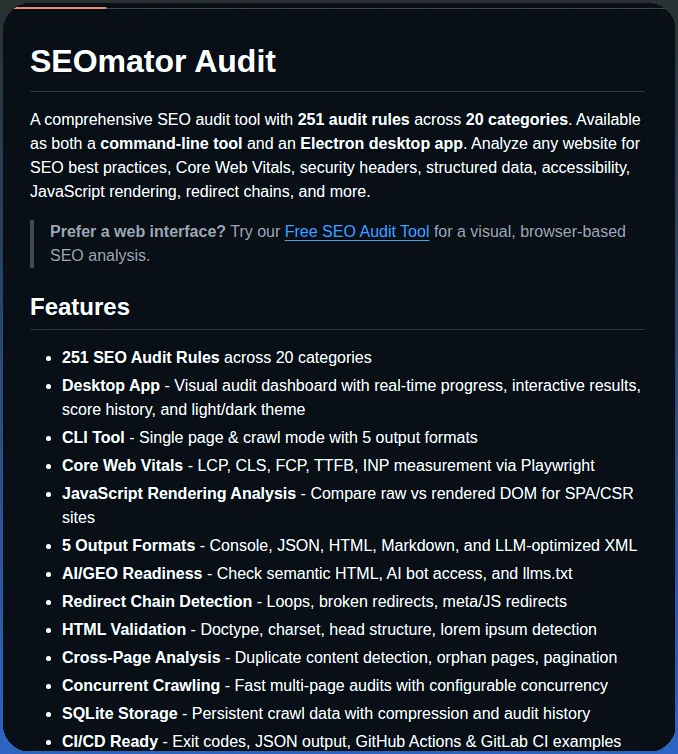
@seomator/seo-audit has 18 published versions, 28,949 npm downloads since its 23 January 2026 launch, and 6,786 in the 30 days to 12 October.On 21 May 2026 Tom Dörr shared the repository on X. His post quotes the README of the day, which listed 251 rules; version 5.1.0 ships 365.
Audits websites with 251 rules across 20 categories
github.com/seo-skills/seo-audit-skill
 · View on X
We open-sourced the SEOmator audit engine because an audit you can't read is a black box, and you shouldn't hand a black box to an agent. When a rule fails, you should be able to open its source and see what it measured and which threshold it used. A closed tool asks you to take the verdict on trust.
The other reason is where site changes come from now. On the codebase behind this website, 310 of the 441 commits since April 2026 carry a Claude co-author line. When the audit lives in a separate dashboard, someone copies findings across by hand. When it's a command the agent can call, the agent runs the audit, edits the template and runs the audit again to check its own fix.
We still run SEOmator as a business, and our paid plans are how we pay for it. The CLI is the audit engine on its own: no account, no usage cap, no upsell in the output.
A rule engine returns the same verdict for the same page every time. A prompt-only SEO skill asks the model to judge the page, and a model's judgment can drift between runs. A Claude Code skill is a folder of instructions, plus optional scripts, that the agent loads when a task matches; Anthropic's Claude Code skills documentation explains the format. Many SEO skills lean on the model's judgment. Ours is a thin wrapper around a deterministic program.
A model asked to "check the canonical" usually gets it right. It can still word the same finding differently on two runs, skip a check when its context fills up, or call a borderline case one way today and the other way tomorrow. With a rule engine, the model does the part it's good at: deciding what to fix first and writing the fix.
| Prompt-only SEO skill | SEOmator skill + CLI | |
|---|---|---|
| Who decides pass or fail | The model, each run | 365 fixed rules |
| Same page, same result | Not guaranteed | Yes, within one release |
| Score you can track | Rarely | 0 to 100, per category |
| Checks it couldn't run | Often dropped silently | Reported as "not measured" |
| Diff two runs | By hand | seomator compare |
| Commands it may run | Depends on the skill | Bash(seomator:*) only |
Check the last row before you install any skill. Our SKILL.md declares allowed-tools: Bash(seomator:*), so the skill can only run the seomator command. Open the allowed-tools line of any skill you install. It takes ten seconds.
The SEOmator CLI's published release, 5.1.0, runs 365 rules in 20 categories. I counted the rule IDs in the shipped bundle, and the total matches the CLI's own --help. The main branch already has 373, so the README on GitHub says 373 while npm install gives you 365 until the next release.
Each category carries a fixed weight in the overall score. The weights come from the project's rule catalogue and add up to 100.
| Category | Rules (5.1.0) | Weight | Example rule |
|---|---|---|---|
| Crawlability | 37 | 5% | Canonical target not noindexed |
| Accessibility | 35 | 7% | SVG images have a name |
| Performance | 28 | 10% | LCP under 2.5 s |
| Links | 27 | 8% | No broken internal links |
| Security | 26 | 8% | HSTS header set |
| Content | 25 | 5% | Title differs from H1 |
| Core SEO | 24 | 11% | One canonical, absolute |
| Technical SEO | 18 | 7% | robots.txt returns 200 |
| Structured data | 18 | 5% | JSON-LD parses |
| JavaScript rendering | 16 | 5% | H1 present without JS |
| E-E-A-T | 15 | 3% | Author byline present |
| Images | 14 | 8% | Alt text on every image |
| URL structure | 14 | 3% | Lowercase URLs |
| Internationalization | 13 | 2% | Hreflang return links |
| Mobile | 12 | 2% | Viewport allows zoom |
| Redirects | 11 | 3% | No redirect loops |
| HTML validation | 11 | 2% | One title tag |
| AI/GEO readiness | 11 | 2% | AI crawlers allowed |
| Social | 9 | 3% | og:url matches canonical |
| Legal | 1 | 1% | Cookie consent present |
Two of these categories are rare in free tools. JavaScript rendering compares the raw HTML with the rendered page, so it catches a title, canonical or noindex that only appears after JavaScript runs. Google's JavaScript SEO basics explains why that gap matters. AI/GEO readiness checks whether AI crawlers can reach you, whether you publish an llms.txt, and whether your JSON-LD matches the visible page. Our llms.txt adoption study shows how few sites publish that file.
--crawl. If a site-wide problem doesn't show up, check that you crawled.You install the SEOmator CLI once from npm, check your setup, and point it at a URL. A first single-page audit took 30 to 40 seconds on our homepage.
npm install -g @seomator/seo-audit
seomator self doctor          # checks Node, npm, Chrome and the data folder
seomator audit https://example.com
These are the flags I use most:
seomator audit https://example.com --no-cwv                 # skip the browser render (see below)
seomator audit https://example.com -c core,security,perf    # only some categories
seomator audit https://example.com --crawl -m 20            # crawl 20 pages for cross-page rules
seomator audit https://example.com --mobile                 # add a phone-viewport render
seomator audit https://example.com --format html -o report.html   # console, json, html, markdown or llm
For a site you audit often, run seomator init to create a seomator.toml. It holds the crawl limits, the paths to skip and the rules to switch off, so every run uses the same settings. There are presets for blogs, e-commerce and CI.
[project]
name = "my-website"
domains = ["example.com", "www.example.com"]

[crawler]
max_pages = 100
concurrency = 3
exclude = ["/admin/**", "/api/**"]
drop_query_prefixes = ["utm_", "gclid", "fbclid"]

[rules]
enable = ["*"]
disable = ["legal-*"]   # wildcards work
CLI flags beat the local seomator.toml. That beats configs in parent folders, then ~/.seomator/config.toml, then the built-in defaults.
SEOMATOR_HOME to a project folder when you audit client sites. Each client's history and comparisons then stay separate from yours.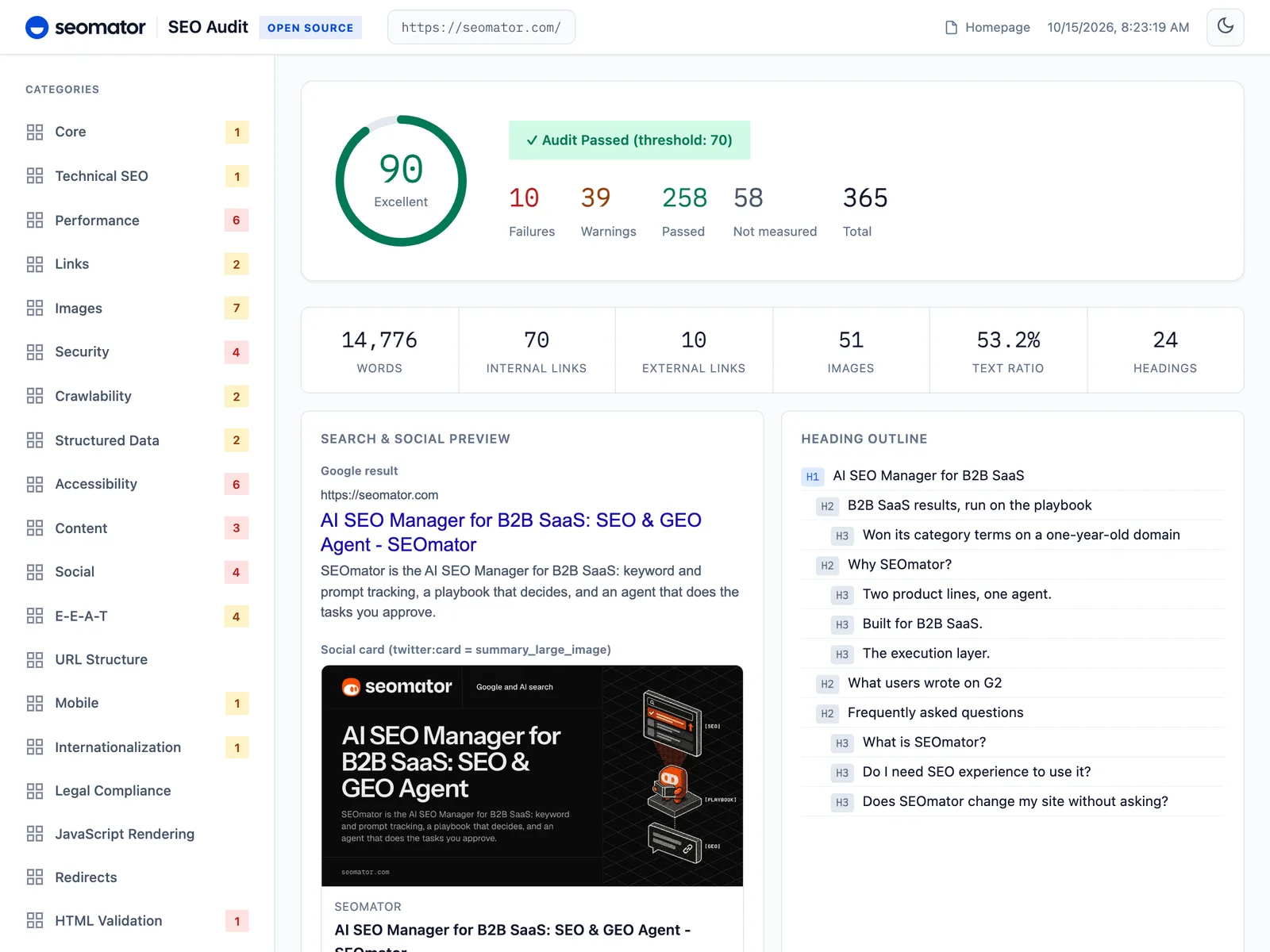
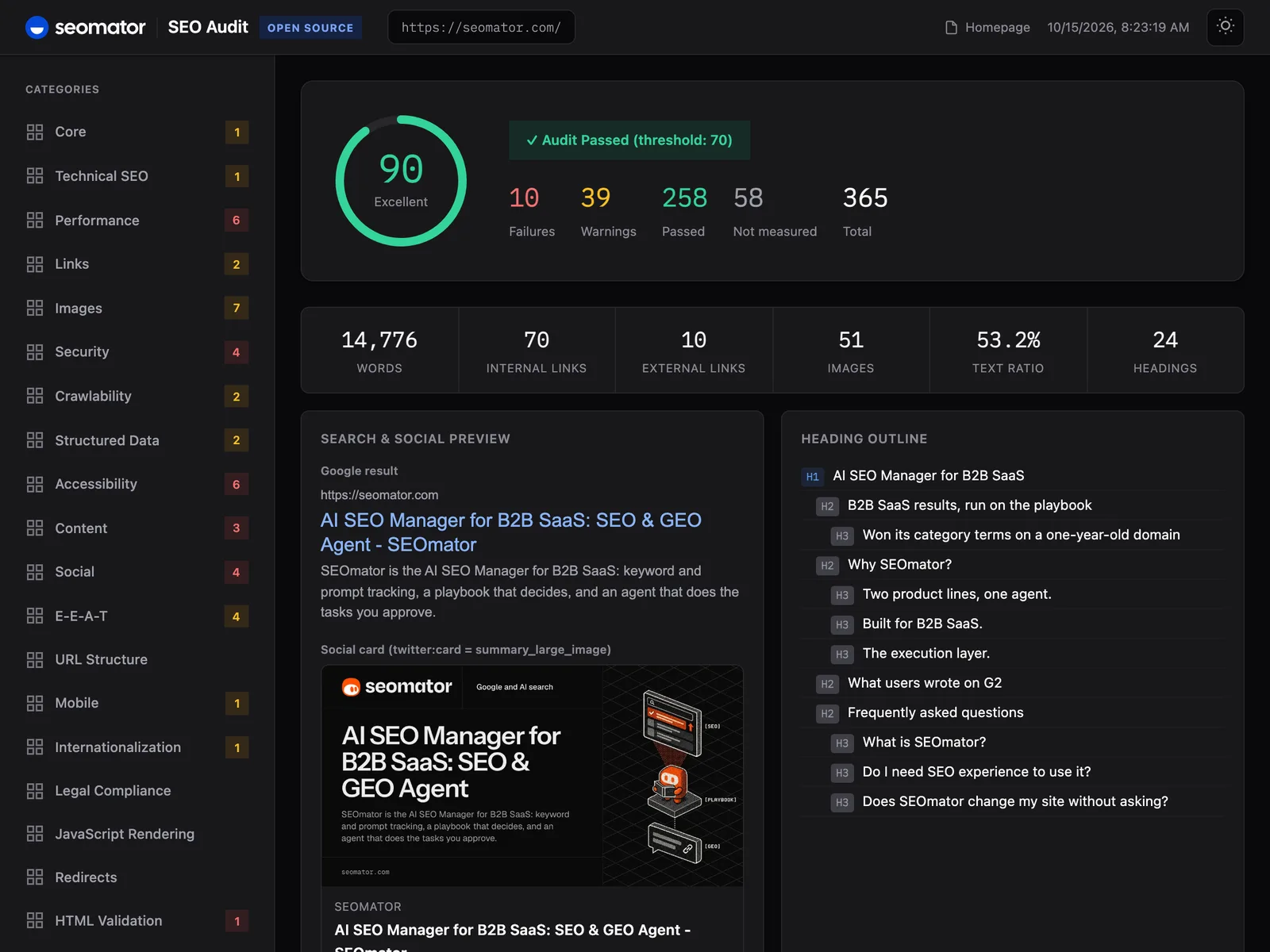
The CLI's HTML report for seomator.com, from @seomator/seo-audit 5.1.0 run without Core Web Vitals, captured 15 October 2026.
The SEOmator CLI gave our own homepage 91 out of 100 on 15 October 2026, with Core Web Vitals on: 277 rules passed, 41 warned, 10 failed and 37 weren't measured. Of the unmeasured ones, 29 need a crawl, 5 need --mobile, INP needs a real user, and 2 minification checks couldn't read the external files. The lab vitals were fine: LCP 0.39 s, CLS 0.000, TTFB 225 ms.
The score tells you little. The 10 failures tell you what to do, so I checked each one by hand.
| Rule | Found | Our read |
|---|---|---|
perf-page-weight | 597 KB of HTML | Real: RSC payload |
htmlval-size-limit | Over 500 KB | Real: same cause |
perf-js-file-size | 301 KB inline JS | Real: same cause |
perf-dom-size | 2,184 nodes | Real: footer list |
a11y-svg-img-alt | 16 of 24 SVGs unnamed | Real, easy fix |
social-og-url | No og:url | Real, we missed it |
social-og-url-canonical | Nothing to match | Same as above |
content-description-pixel-width | About 1,005 px wide | Real: limit ~920 px |
security-csp-xss | unsafe-inline | Known: report-only |
perf-lazy-above-fold | Lazy images on top | Minor: 32 to 48 px logos |
Three of the ten failures have one cause. Our homepage HTML is 611 KB, and 307 KB of it is the React Server Components payload that Next.js inlines into the page. Fix how that payload ships and three rules clear at once. I didn't expect that one, and it's going on our own to-do list.
og:url, which takes one line to fix and affects every share of the page.A 20-page crawl of seomator.com (--crawl -m 20 --no-cwv) scored 91 again and ran all 29 cross-page rules that a single-page audit leaves unmeasured. 24 of them passed. It's slow, though: 12 minutes for 20 pages, fine in CI and tedious at your desk.
The crawl turned one finding into a pattern. og:url is missing on 10 of the 20 pages: the homepage, pricing, the blog index and our tool pages. Blog posts, team pages and the customer story have it. So the gap is in one shared metadata helper, not ten templates, and a single-page audit could never have shown that.
Two crawl findings were wrong for our site:
per_host_delay_ms in seomator.toml or crawl from an allowed IP.@id as SoftwareApplication on one page and WebApplication on another. Both pages declare the same two-item @type array. That's a bug in the rule, not in our markup.The LCP-hint rule needed a closer read too. On blog posts it picked the 48 to 96 px author avatar in the byline as the LCP candidate, because that's the first image in the DOM. The real LCP element there is the cover image.
The --no-cwv flag skips the headless browser render, and on our homepage it saved about 5 seconds (39 s down to 34 s). It also moved 21 rules from measured to "not measured": the Core Web Vitals, the raw-versus-rendered JavaScript checks, console errors and failed requests. The score barely moved, from 91 to 90, because rules that didn't run don't count.
That's by design. A rule the CLI couldn't run never shows up as a pass; it's listed as "not measured", with the reason. INP is the clearest case. It needs a real person using the page, so no lab run can measure it. INP is a field metric, as web.dev's guide to Interaction to Next Paint explains, so read it from real-user data such as the Chrome UX Report. For a rough number, --simulate-interaction scrolls and clicks the page and reports a synthetic INP that doesn't count toward the score.
seomator compare won't let you mix the two modes up. When I compared our two homepage runs, it opened with a warning that they weren't measured the same way ("Core Web Vitals: true → false") before it showed any diff.
--no-cwv audit with a full one and call the change a regression or a win. Pick one mode per site and keep it, ideally in seomator.toml.My rule: --no-cwv for a quick look, the full render for anything you'll act on. Five seconds is a fair price for 21 more measurements.
You install the SEOmator skill once, then ask Claude Code in plain words. The skill tells the agent which commands to run, which flags answer which question, and how to read the exit codes.
npm install -g @seomator/seo-audit
npx skills add seo-skills/seo-audit-skill
Then, inside Claude Code:
Run an SEO audit on https://example.com
Audit https://mysite.com and tell me what to fix first
Check SEO health of https://example.com with a 20-page crawl
/seo-audit https://staging.example.com
The agent runs seomator audit with --format llm, reads the report and proposes fixes in your codebase. The skill recommends plan mode, so the agent lays out every fix before it touches a file. Afterwards it can re-run the audit and call seomator compare to show which rules flipped.
You don't need the skill to use the format. Any model can read the report from a pipe:
seomator audit https://example.com --format llm --no-cwv | claude "analyze and prioritize fixes"
The llm format is compact XML written for a model's context window. On our homepage the LLM report was 40.6 KB, against 190.7 KB for the JSON report of the same run, so 79% smaller. The Markdown report was 26.1 KB and the HTML one 411.9 KB.
The format also assumes the page you audit might attack the agent reading the report. Any text the CLI copies from the site, such as a title or an error message, goes inside a tag named with a random nonce made for that run. A notice at the top tells the model to treat those blocks as data, never as instructions. Our homepage report had 98 of them.
Hidden instructions in a web page are a real attack: prompt injection is first on OWASP's list of LLM risks. An SEO audit reads untrusted pages all day, so it needs that wall.
The SEOmator CLI's exit codes let a pipeline tell a bad page from a broken run. Add one audit step and the build fails when the score drops below 70.
| Exit code | Meaning |
|---|---|
| 0 | Success: the score is 70 or above |
| 1 | The audit ran and scored below 70, or compare --fail-on-regression found a regression |
| 2 | The command failed: unreachable URL, HTTP error, bad config |
| 130 | Cancelled with Ctrl-C |
Code 1 means the tool worked and is grading the site, so treat it as a failing grade, not a crash. Only code 2 means the audit couldn't run. With --format json or --format llm, a code 2 also prints a structured error with a stable code field a script can branch on.
name: SEO Audit
on:
  pull_request:
    branches: [main]

jobs:
  audit:
    runs-on: ubuntu-latest
    steps:
      - uses: actions/checkout@v4
      - uses: actions/setup-node@v4
        with:
          node-version: '22'
      - run: npm install -g @seomator/seo-audit
      - run: npx playwright install chromium
      - run: seomator audit https://your-staging-url.com --format json -o seo-report.json
      - uses: actions/upload-artifact@v4
        if: always()
        with:
          name: seo-report
          path: seo-report.json
The stronger gate compares two runs. Audit before and after a deploy, then run seomator compare example.com --fail-on-regression, which exits 1 if the score dropped or new failures appeared. It diffs by rule ID, so a rule that broke and a different rule that got fixed show up as two lines instead of cancelling out. Our SEO audit guide covers what to do with the findings once the gate trips.
Use the SEOmator CLI if you work in a terminal or with an AI agent, the free audit tool if you don't, and the SEOmator platform if you want the whole site audited for you on a schedule. Lighthouse sits beside all three as the best single-page performance profiler.
Lighthouse audits one page per run, in groups for performance, accessibility, best practices, SEO and, more recently, agentic browsing, which includes an llms.txt check. Its SEO group covers the basics. The CLI measures Core Web Vitals too, then adds crawlability, structured data, redirects, hreflang, security headers, E-E-A-T signals and AI-crawler access, across a crawl.
| Lighthouse | SEOmator CLI | Free audit tool | |
|---|---|---|---|
| Runs in | DevTools, CLI, PSI | Terminal, CI, agent | Browser |
| Pages per run | 1 | 1, or a crawl | 1 |
| Checks | 5 audit groups | 365 rules | 172 checks |
| llms.txt check | Yes | Yes | Yes |
| Diff two runs | No | Yes | No |
| Reports | HTML, JSON | 5 formats | Web, PDF |
| Cost | Free | Free, MIT | Free |
I use Lighthouse and the CLI side by side. Lighthouse's trace view is still where I go when one page is slow. The CLI is what I script, because it covers the crawl, structured-data and AI-crawler checks Lighthouse doesn't, and it remembers the last run.
If you're an SEO who'd rather not open a terminal, start with our free SEO audit tool: it runs 172 checks in the browser and exports a PDF report. If you need more than one page at a time, the SEOmator platform crawls the whole site on a schedule, keeps every audit, and ranks fixes by the pages that earn clicks in your Search Console. If you run a B2B SaaS site, book a 30-minute demo and I'll study your site before we talk. Agencies with many client sites should also read our guide to SEO audit tools for agencies.
The SEOmator CLI is a lab tool, and it has a lab tool's limits. Here's where I'd be careful.
--crawl stops at 10 pages unless you raise -m. Site-wide problems need a crawl, and a crawl takes time.For a site you can't install anything on, or a whole site crawled the way Googlebot sees it, use the hosted SEO crawler instead.
Yes. @seomator/seo-audit is MIT-licensed, so you can install it, run it in CI, change it and use it commercially at no cost. There's no account, API key or usage cap. The SEOmator platform is paid, but the CLI doesn't depend on it.
No. Use the free SEO audit tool on seomator.com instead: you paste a URL, it runs 172 checks in your browser, and it exports a PDF you can send to whoever builds your site. The CLI earns its keep when you want audits in scripts, CI or an AI agent.
The CLI fetches the site you audit and stores results locally in ~/.seomator/audits.db. The project's documentation says seomator serve binds to loopback only and makes no outbound requests. I searched the published 5.1.0 bundle: the only analytics names in it, Google Analytics and Mixpanel, are patterns the rules use to detect trackers on the page being audited.
No. The LLM report contains the audit and nothing else. In our homepage report, every mention of seomator.com was the audited URL itself, and there was no promotional footer or added instruction.
The skill installs with npx skills add seo-skills/seo-audit-skill and works in Claude Code and in other agents that read the same skill format, such as Cursor. Any agent that can run a shell command can also call seomator audit --format llm without the skill.
For Core Web Vitals and the JavaScript rendering rules, yes. The CLI uses the Chrome, Chromium or Edge you already have, and seomator self doctor tells you which one it found. Without a browser, run with --no-cwv; the browser-only rules then report "not measured".
As many as you set with --max-pages; the default is 10. Concurrency defaults to 3 requests, and by default the crawler waits between requests and respects robots.txt, so a large crawl stays polite to the server.
The README follows the main branch, which has eight rules that aren't in the published 5.1.0 package yet. npm install gives you 365 until the next release. seomator --help always prints the count for the version you have.
Yes. List them under [rules] disable in seomator.toml, with wildcards such as legal-*, or audit only some categories with -c core,security,perf. Disabled rules drop out of the score.
The CLI is our audit engine as a free, standalone tool. The platform runs audits across the whole site on a schedule and adds rank and AI-visibility tracking, team history and an agent that does approved tasks. Developers can start with the CLI and non-technical SEOs with the free audit tool; when you need the whole site tracked over time, that's the platform.
Who wrote it, what changed and how to tell us about a mistake.

Emre Elbeyoglu
Founder & CEO, SEOmator
16+ years in B2B SaaS SEO and growth
Emre Elbeyoglu is founder and CEO of SEOmator. Alongside running the company, Emre is its Head of Growth and leads all of SEOmator's growth work. Emre is also the founder and director of Next Marketing Technology Ltd, the London company that has owned and operated SEOmator since 2023. Emre has worked in B2B SaaS SEO and growth marketing for more than 16 years and builds every acquisition channel on search: that approach has generated $10M+ in total revenue from organic search across Emre's products, driven 300K+ monthly organic visitors and earned 10K+ referring backlinks.
In 2013 Emre co-founded Flatart, a digital marketing agency that ran SEO and growth programs for brands including Investing.com, Rakuten and EuroDNS. That consulting work turned into products: Popupsmart, an AI-powered conversion rate optimization platform used by 600+ clients, and LiveChatAI, an AI customer support tool covered by WIRED. Emre also publishes growth marketing experiments at GrowthMarketing.ai.
Published
Spot a mistake or a number that has gone stale? Tell us. We correct it and log the change in the History above. Report an error →
Compare SEOmator plans
You are already comparing tools. Here is ours, priced in public, next to what each plan actually includes.
Compare SEOmator plans· 17 min read
Connect Google Search Console to Claude or Codex in two minutes with SEOmator's free GSC MCP: one command, a browser sign-in, no Google Cloud project.
· 23 min read
Learn how to do an SEO audit of any website in 2026 — technical, on-page, off-page, and AI-search checks — then run a free audit to fix issues fast.
· 13 min read
Seven of nine SEO audit platforms offer white-label reporting — but almost never on the plan the roundups name. We checked every vendor's published pricing on 13 September 2026: the cost to unlock white label ranges from $50 to $1,089 a month, and two popular "white-label" tools do not offer it at all.


