


· 28 min read
Top 8 Mangools Alternatives Compared (2026 Pricing)
Eight Mangools alternatives, every price re-checked on the vendor's own pricing page (2 Sept 2026), plus an honest AI-visibility column. Find your fit.
Wappalyzer went closed-source in 2023. Free, open-source and paid alternatives compared on October 2026 pricing, plus a real 3-mode scan of our own site.

Oğuzhan Ulukaya · Software Developer, SEOmator
Full-stack TypeScript developer building B2B SaaS products since 2021
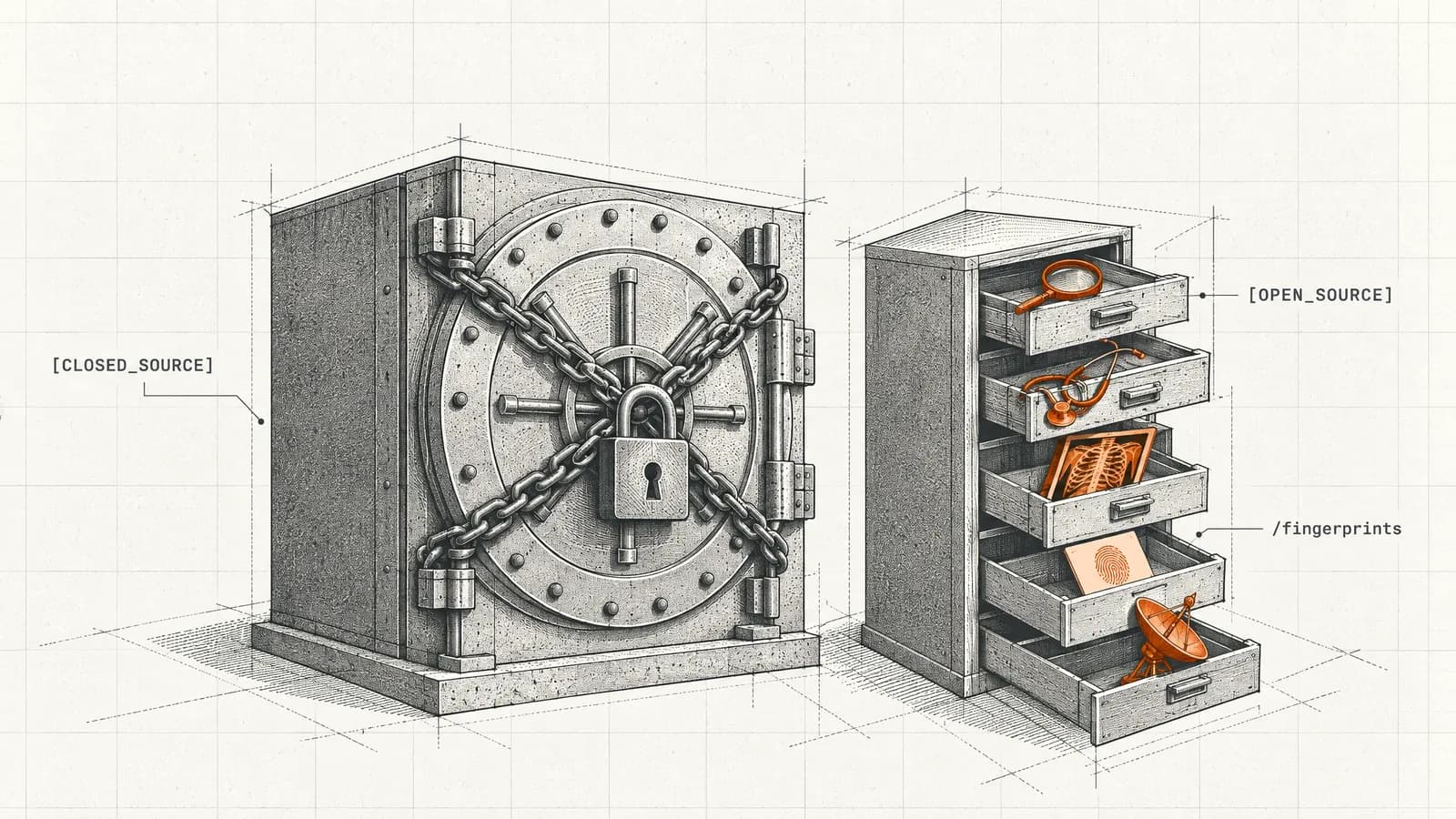
Wappalyzer went closed-source in August 2023, so the right alternative depends on what you need back. For the open ruleset, use enthec/webappanalyzer; to script the official detector, wappalyzer-next; for free browsing, WhatRuns or Wappalyzer's own extension, still free; for history and lists, BuiltWith from $295 a month. Wappalyzer's own API now starts at $450.
enthec/webappanalyzer, the actively maintained GPL-3.0 ruleset.wappalyzer-next, which runs Wappalyzer's extension in headless Chromium.Most people searching for a Wappalyzer alternative are reacting to something specific: in August 2023, Wappalyzer went closed-source. The GitHub repository was taken down, the npm package was deprecated, and the community-contributed fingerprint database — until then GPL-3.0 licensed — was absorbed into the commercial product.
If you are looking for a replacement because of that, this guide covers the open-source continuations, the free tools, and the paid platforms. Every price and figure below was read from the vendor's own page on 20 October 2026 and is linked to its source; the ZoomInfo section was last checked in July 2026. Where a vendor does not publish a number, this guide says so instead of estimating one.
I build React and Next.js front ends for B2B SaaS products, so I read these tools the way a developer does: by asking what each one can physically see. To make that concrete, we also scanned seomator.com, the one site whose stack we can check line by line against its source code, with all three modes of an open-source Wappalyzer wrapper. The results are below.
Nearly every "Wappalyzer alternatives" article ranks tools by detection accuracy. Almost none of them publish a method, a sample, or a date. One page currently ranking for this term promises "Tested on 50 Real Sites" in its title tag and contains no test data at all.
An earlier version of this article did the same thing, and it was wrong to. It contained accuracy tables presented as head-to-head test results. Those tables have been removed, along with the testing narrative around them, because they were not backed by a test anyone ran. Removing them is the honest correction, and inventing replacement numbers would repeat the original error.
What replaces them is more useful anyway: an explanation of why each tool's detection method determines what it can and cannot see, one small real test on a site we can verify, and a benchmark procedure you can run against your own sites in an afternoon. Your results will be more relevant to your work than anyone else's would be.
"Wappalyzer's extension went paid." It did not. The browser extension still performs technology detection for free with no account required. What is capped is the account — the free plan includes 50 technology lookups and 50 email verifications per month — and the API. (Wappalyzer pricing, October 2026) The Firefox add-on is current too: version 6.12.7, updated 5 October 2026.
"Wappalyzer was acquired by Dun & Bradstreet." This appears on at least one page currently ranking for this keyword, and there is no completed acquisition on record. Wappalyzer remains independent. The confusion may stem from an unrelated deal: Dun & Bradstreet itself was acquired by Clearlake Capital in 2025.
"Wappalyzer Pro comes with the API." It does not. The $250 Pro plan shows a cross on the pricing page for both included API credits and CRM enrichment; API credits start with Business at $450 a month (20,000 credits). This is the myth an AI assistant is most likely to hand you right now, which is why we checked the engines directly instead of assuming, the same way our AI visibility checker compares what AI answers say about a brand.
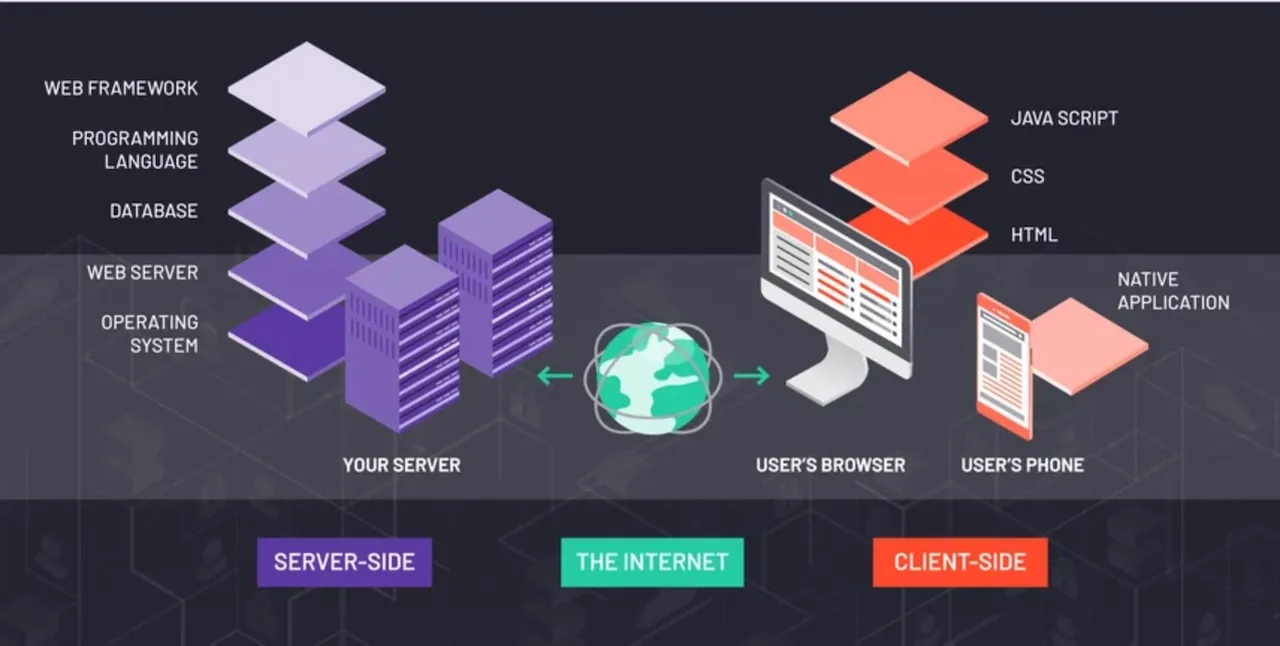
Every difference in accuracy between these tools traces back to one architectural decision: where the tool looks. Understanding this is more useful than any ranking, because it tells you in advance which tool will fail on which technology.
There are four broad approaches.
Rendered-DOM inspection (browser extensions). The tool runs in your browser and examines the page after JavaScript has executed. Wappalyzer's extension inspects "HTML, scripts, cookies, network requests, and certificates on the pages you visit, looking for unique technology fingerprints" (Wappalyzer extension FAQ). This catches client-side frameworks that inject themselves at runtime — React, Vue, Next.js — which a raw HTML fetch can miss entirely.
Server-side crawling (databases). The vendor crawls the web on a schedule and stores what it finds, so you query a database rather than a live page. BuiltWith describes it plainly: "We index the Internet in the same way that Google does to power their search engine. We don't get data from any third parties" (BuiltWith FAQ). This is what makes historical data and "list every site using X" queries possible — and it is also why the data reflects the last crawl rather than the current moment.
Header, DNS and certificate signals. Some technologies never appear in page markup at all. A Server: or X-Powered-By response header, an MX record, an SPF record, or a TLS certificate issuer can each identify infrastructure that is invisible to any amount of DOM inspection. You can check these yourself — SEOmator's free HTTP header checker shows a site's response headers.
Inference from external signals. Job postings, public code repositories, and financial filings can indicate internal technology. This is the least reliable category and the hardest to verify.
A browser extension cannot detect your database. Not because it is a weak product, but because your database emits no client-side signal. PostgreSQL, Redis, and internal service frameworks do not announce themselves in the DOM. Any tool that claims strong backend detection is either reading headers and DNS, inferring from job listings, or guessing.
The reverse is also true. A scheduled crawler that fetches raw HTML without executing JavaScript will under-report client-side frameworks — the same asymmetry Googlebot faces between its crawl and render waves, which is precisely why this matters for SEO work and not just prospecting.
Two further complications apply to every tool on this list:
Mechanism arguments are only useful if they predict real results, so we tested one. On 20 October 2026 we ran wappalyzer-next 2.0.4 against the seomator.com homepage in its three modes:
We picked our own site for one reason: it is the only site where we can check every answer against the source code, the response headers and the DNS records, so misses and false positives are countable rather than guessed.
| What we run | fast | balanced | full |
|---|---|---|---|
| Next.js | Yes, no version | Yes, no version | Yes, 16.2.1 |
| React, Vercel, Adobe Fonts | Yes | Yes | Yes |
| Radix UI, Lucide icons | Yes | Yes | Yes |
| Open Graph, PWA manifest | Yes | Yes | Yes |
| Priority Hints | Yes | Yes | Yes |
| Tailwind CSS | – | – | Yes |
| Base UI | – | – | Yes |
| Motion (Framer Motion) | – | – | Yes |
| Turbopack | – | – | Yes |
| PostHog (proxied) | – | Yes | Yes |
| TinyAnalytics | – | – | As "Rybbit" |
| Amazon SES (SPF) | – | Yes | – |
| Cloudflare (DNS) | – | As "CDN" | – |
| Google Workspace (MX) | Missed | Missed | Missed |
| HSTS header | Missed | Missed | Missed |
| False positives | 1 | 2 | 0 |
| Reported | 11 | 16 | 16 |
Scanned 20 October 2026, 12:17 UTC. Motion is the library formerly called Framer Motion, and was reported under that name. Each count includes one self-match (the rulesets carry a fingerprint for SEOmator itself); balanced mode also reported Amazon Web Services, implied by SES.
Four things stand out, and each one matches the mechanism described above.
smtp.google.com, the value Google's setup instructions now give for Google Workspace. The open ruleset's Google Workspace fingerprint — in both enthec/webappanalyzer and the set wappalyzer-next bundles — only matches aspmx.l.google.com and googlemail.com, the older values Google says pre-2023 domains may still use.One result is worth a closer look. Our analytics script exposes a Rybbit-compatible window.rybbit object, so the extension named the wrong vendor from a real signal. A benchmark that only counts hits would score that as correct.
What I take from this, as someone who builds Next.js front ends: the browser-extension mode is the one to trust for what a page uses, and it is blind to everything that lives in DNS. If you need both, run a DNS lookup next to it rather than hoping one tool covers the two. And treat any HTTP-only scanner's output as a list of leads to confirm, not as a stack.
To repeat the scan on a site of your own:
pipx install wappalyzer
pipx run --spec playwright playwright install chromium
wappalyzer -i https://example.com --scan-type fast -oJ fast.json
wappalyzer -i https://example.com --scan-type balanced -oJ balanced.json
wappalyzer -i https://example.com --scan-type full -oJ full.json
This is the category most guides skip, and it is what a large share of people searching for alternatives actually want.
When Wappalyzer closed its repository in 2023, the last GPL-3.0 fingerprint set was already public, and several projects continued from it. enthec/webappanalyzer describes itself as "a continuation of the iconic Wappalyzer that went private in August 2023" and maintains the technology definitions; it is the most active, with new technologies merged as recently as 19 October 2026. HTTPArchive/wappalyzer is the fork HTTP Archive runs for its monthly crawl of the web, and its README is explicit that it is not the code behind Wappalyzer's website or extension.
dochne/wappalyzer is different in kind. It describes itself as "the last commit of Wappalyzer before it went private" and was last updated in November 2024, so treat it as a snapshot rather than a continuation.
One caveat applies to this whole category, and it is rarely mentioned: most free technology detectors — including several marketed as independent products — run forks of Wappalyzer's pre-2023 ruleset. They therefore inherit its blind spots exactly. If Wappalyzer's signature set could not see a technology in 2023, a fork of it generally still cannot. Swapping to a fork changes the license and the price, not the detection ceiling. Our scan above shows the other half of the problem: a fingerprint that was right in 2023, like the Google Workspace one, quietly stops matching when the vendor changes how it works.
Check the commit history before relying on one. A fork that has kept pace with new frameworks is genuinely useful; one that was archived in 2024 is a snapshot of a three-year-old web.
Lissy93/wapalyzer, is archived. Read the last commit date before you install anything.wappalyzer-next takes the opposite approach to the forks. Instead of maintaining old fingerprints, it is a GPL-3.0 command-line tool and Python library (installed as wappalyzer from PyPI) that loads the official Wappalyzer browser extension into headless Chromium through Playwright. Its README argues that projects forked from the open version "are using outdated fingerprints and lack accuracy on dynamic web apps."
The trade-off is that it doesn't make the fingerprints open. The full mode runs Wappalyzer's closed-source extension, so you get today's detection from a script, not a ruleset you control. The fast and balanced modes use a bundled set of 7,291 technologies and no browser. If I needed Wappalyzer-grade detection inside a script today, this is where I'd start, and the three-mode scan above is what it looks like in practice.
WhatWeb is a long-standing open-source command-line scanner with its own independent signature set rather than a Wappalyzer fork. It suits automation and bulk scanning, and it is a different tool in character from a browser extension — you will be reading terminal output, not a popup panel. For anyone comparing "WhatWeb vs Wappalyzer," the honest summary is that they are built for different jobs: one for scripted scanning, the other for point-and-click research while browsing.
If you would rather not install anything, a hosted lookup answers the one-off "what is this site built with" question without an extension. This category suits single-site checks; bulk export and historical data typically move into paid plans.
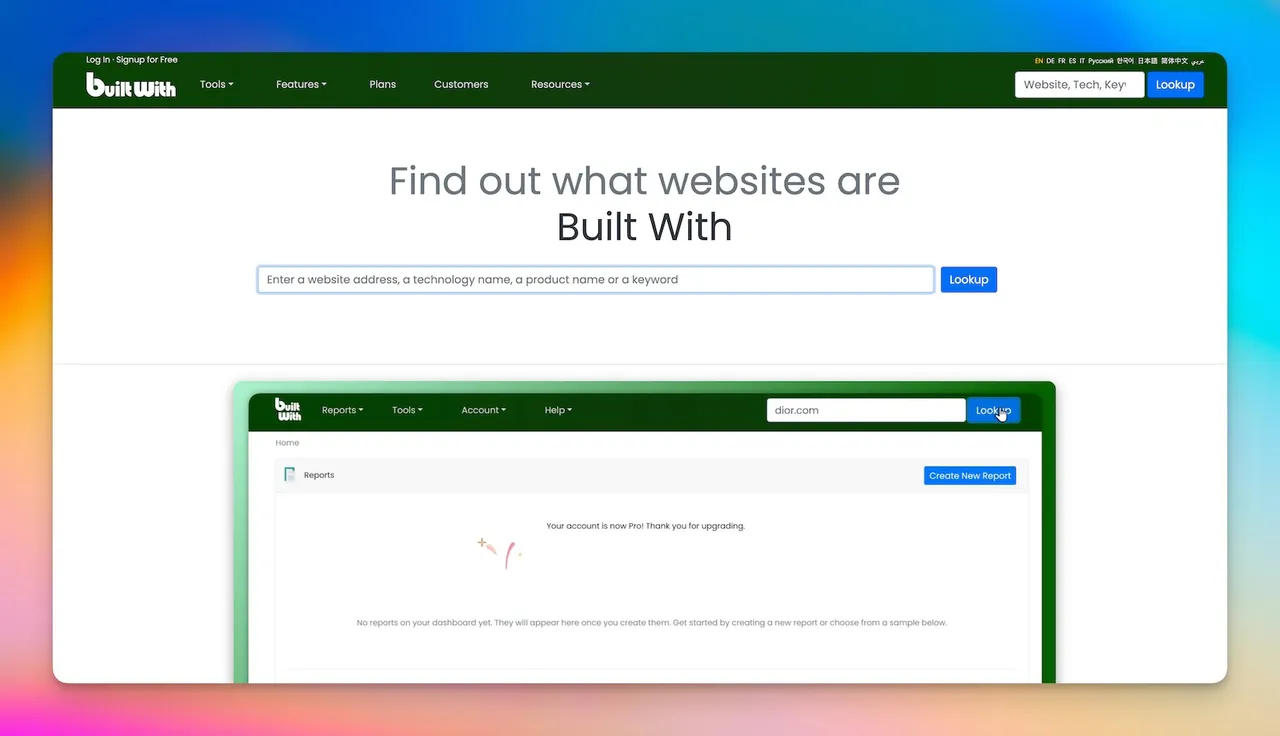
BuiltWith is the closest thing to an opposite of Wappalyzer's extension: a scheduled server-side crawl feeding a queryable database.
| Best for | Market research, historical tracking, building lists by technology |
| Detection method | First-party server-side crawl (BuiltWith FAQ) |
| Entry price | $295/month (Basic) |
| Coverage | 491.9 million domains; 127k+ technologies (source, October 2026) |
| Historical data | 18+ years, included from the Basic plan |
| Main limitation | Data reflects the last crawl, not the live page |
Its strongest verifiable differentiator is history. BuiltWith publishes "18+ years of technology history" and includes it from the entry plan, with the Domain API supporting date-range queries. Neither Wappalyzer nor WhatRuns publishes a comparable historical claim. If you need to know when a site adopted or dropped something — a platform migration, an analytics swap, a CDN change — this is the differentiator that matters.
For SEO work specifically, that time dimension is the useful part. A competitor's replatforming date gives you a before-and-after boundary for their ranking history that no live-detection tool can reconstruct.
On coverage figures: BuiltWith's own homepage now reads 127k+ technologies (123,451+ in July) and its plans page states data from 491.9 million domains. Both are live counters and will drift, which is why they are cited here with a date.
What BuiltWith does and does not publish: no API pricing appears on its public API page. On refresh frequency, its plans page now says the data from those domains is "updated weekly." The widely repeated claim that BuiltWith "crawls daily" still does not appear in its own documentation — it originates in third-party write-ups. Weekly is BuiltWith's own claim; if recency matters to you, test it with a site you know recently changed.
| Best for | Quick free lookups, WordPress themes and plugins, front-end details |
| Detection method | Browser extension; mechanism not publicly documented |
| Price | Free, no sign-up required |
| Coverage | "Thousands of technologies" — no exact figure published |
| API | No official public API |
| Chrome Web Store | 4.3 stars, 850 ratings, 400,000 users (October 2026) |
WhatRuns is free and requires no account. It also offers a forward-looking "follow this site" alert that notifies you when a followed site's stack changes — worth distinguishing from historical data, because it only accumulates from the moment you start following.
A correction: earlier versions of this article, and many others still ranking, list a WhatRuns "Premium" tier at $9/month. That figure could not be verified. The whatruns.com/pricing page loads but contains no plan table or price of any kind, and the homepage presents the product as free. The $9 figure appears to originate in third-party listicles, several of which confuse WhatRuns with WhatRunsWhere, an unrelated advertising-intelligence product with entirely different pricing. If you have seen $9/month quoted for WhatRuns, that is likely where it came from.
The myth may be fading. When we asked the same four AI engines "Is WhatRuns free?" on 20 October 2026, all four said yes, none quoted $9, and Google AI Mode added the WhatRunsWhere warning on its own.
WhatRuns publishes no explanation of how it matches signatures, so this guide makes no claim about its detection mechanism beyond the fact that it ships as an extension. Practitioner opinion is mixed; some find it thin compared to Wappalyzer's extension. Since it is free, testing it costs nothing but a few minutes.
| Best for | Enterprise sales teams needing technographics inside a full account-intelligence platform |
| Detection method | Not publicly documented in detail |
| Price | Not published. Contact sales |
| Coverage | 30,000+ technologies, 30M+ companies, 300M+ company-technology pairings, 200+ categories (ZoomInfo's own figures, July 2026) |
ZoomInfo is a different category of product. Technology detection is one input into a platform built around contact data, intent signals, and CRM enrichment — you would not buy it to identify a CMS.
On pricing: ZoomInfo publishes no prices. The "~$15,000/year" figure that circulates in comparison articles — including a previous version of this one — is not a ZoomInfo figure and should not be treated as one. Procurement data from Vendr puts the median contract meaningfully higher, around $31,875. The honest answer is that you will not know your price until you speak to their sales team, and it will depend on seats, credits, and modules.
On the "95% accuracy" claim: this one is real but narrower than it is usually quoted. It is a contractual guarantee in ZoomInfo's licence terms that 95% of contacts work at the company stated. It explicitly does not cover email deliverability, phone-number accuracy, or job titles. Quoting it as general data accuracy overstates it.
On contact volume: ZoomInfo's own published figures conflict across pages, so this guide omits a contact count rather than picking the most flattering one.
| Best for | Pairing technology detection with traffic and competitive data |
| Price | Not currently published — the pricing page returns a 404 (checked 20 October 2026) |
| Historical data | 10 years claimed |
| Extension | SimilarTech's site now links to the Similarweb Sales Extension (4.3 stars, 17 ratings, 20,000 users, October 2026) |
SimilarTech's distinguishing feature is its relationship with Similarweb's traffic dataset — technology detection alongside traffic estimates and audience data, which is genuinely useful context when profiling a competitor.
Its 10-year historical claim is plausible on its face; the company has operated since 2012.
Proceed with some caution on the current state of the product. As of October 2026 the pricing page still returns a 404 and the www subdomain still does not resolve, though the main site is up. Any specific price you find quoted for SimilarTech — the $290/month figure appears in several articles — comes from a page that no longer exists. Confirm current terms directly before planning around it.
Disclosure: TechnologyChecker is an SEOmator customer. This section applies the same checks as every other tool in this guide.
TechnologyChecker.io markets historical technology data bundled with contact information, at published prices of Free (100 lookups a month), $89/month (Pro, 10,000 lookups) and $249/month (Scale, 50,000+) — notably more transparent pricing than ZoomInfo or SimilarTech currently offer.
It is, however, still new: the domain was registered in August 2025, making the product about fourteen months old at the time of writing, and its Chrome extension shows 5.0 stars from 3 ratings (298 users). A 5.0 average from three reviews is not comparable to WhatRuns' 4.3 from 850, and presenting those side by side without the counts would be misleading.
Its marketing describes a 20-year historical dataset, and its homepage now states the method plainly: recent years come from its own crawls, and prior years are rebuilt from public web archives such as Common Crawl. That is a legitimate technique, but it is archive reconstruction rather than two decades of first-party observation, and a product whose domain dates from 2025 could not have the latter. Its published technology count also still differs between its homepage (40,000+) and its Chrome Web Store listing (10,000+).
None of this makes it a bad tool; it may well be a good one. It means its claims are not yet independently verifiable, and it does not belong in the same tier as platforms with a decade or more of public track record. Evaluate it on a trial against your own sites.
All figures read from vendor pricing pages on 20 October 2026. Anything a vendor does not publish is marked as such rather than estimated.
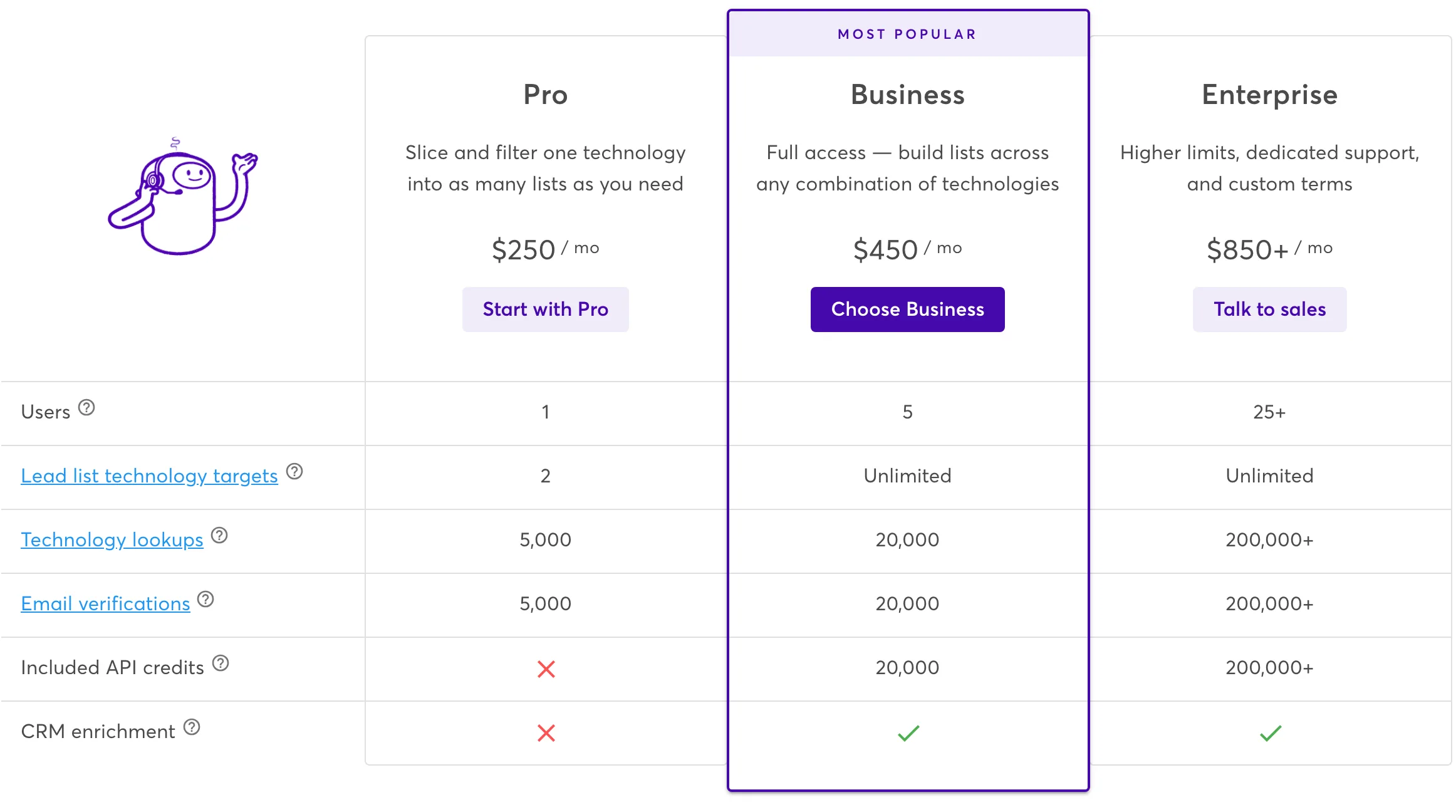
Wappalyzer's plan grid, captured 20 October 2026. Note the cross under Pro for included API credits.
| Tool | Entry price | What you get | Source |
|---|---|---|---|
| WhatRuns | Free | Full extension detection, no sign-up | whatruns.com |
| Open-source forks | Free | Self-hosted, pre-2023 fingerprint lineage | GitHub |
| wappalyzer-next | Free | The official extension, run from a script | GitHub |
| Wappalyzer Free | $0 | 50 lookups + 50 email verifications/month, 5 website alerts | Wappalyzer pricing page |
| Wappalyzer Plus | $10/mo | 200 lookups/month, company and contact data in the extension | Plus page |
| Wappalyzer Pro | $250/mo | 5,000 lookups, 1 user, 2 list technologies, no API credits | Wappalyzer pricing page |
| Wappalyzer Business | $450/mo | 20,000 lookups and API credits, 5 users, CRM enrichment | Wappalyzer pricing page |
| Wappalyzer Enterprise | $850+/mo | 200,000+ lookups and API credits, 25+ users | Wappalyzer pricing page |
| BuiltWith Basic | $295/mo | 2 technologies, 2 keywords, 18+ yrs history | BuiltWith plans page |
| BuiltWith Pro | $495/mo | Unlimited technologies and keywords | BuiltWith plans page |
| BuiltWith Team | $995/mo | Unlimited Pro logins | BuiltWith plans page |
| TechnologyChecker.io | Free; $89/mo (Pro) | 100 lookups free, 10,000 on Pro; Scale at $249/mo | pricing |
| SimilarTech | Not published | Pricing page returns 404 | — |
| ZoomInfo | Not published | Contact sales | — |
Four things this table corrects, because they are widely repeated:
At Wappalyzer's published rates, Plus and Pro both work out to $0.05 per lookup ($10 ÷ 200 and $250 ÷ 5,000) and Business to $0.0225 ($450 ÷ 20,000). Cost per lookup falls as volume rises, which is the normal shape — but only counts if you actually use the allowance before the credits expire.
BuiltWith is not directly comparable, since its plans meter technologies and reports rather than lookups.
Rather than trusting anyone's accuracy table, including one on this page, run this. It takes an afternoon and produces results that are actually about your work.
1. Build a ground-truth set of 20–30 sites you can verify. This is the part that makes the exercise valid, and the reason most published benchmarks are worthless — you must know the right answer independently. Good sources: your own properties, current and former clients, sites whose engineering blogs document their stack, and sites whose public repositories reveal it.
2. Include deliberately hard cases. A benchmark of ten WordPress sites tells you nothing, because everything detects WordPress. Include at least a few of each:
3. Record three things separately, not one. Every comparison article collapses these, and they are different properties:
4. Note false positives, not just misses. A tool that reports six technologies a site does not use is worse than one that reports three fewer and is right. Most benchmarks only count hits, which rewards over-reporting.
5. Test the categories you actually care about. If you evaluate stacks for technical SEO, weight CMS, CDN, tag manager, and JS framework detection heavily and ignore CRM detection. If you prospect, weight the reverse.
The result will not be publishable as a universal ranking — a 25-site sample is not one, and neither was any table it replaces. It will be a reliable answer to the only question that matters: which tool is right most often on sites like yours.
You want free, and you want it now. WhatRuns or the Wappalyzer extension. Both are free; the extension's detection remains free without an account.
You want open-source or self-hosted. Start with enthec/webappanalyzer, the most active fork, checking commit recency first. Use WhatWeb if you need CLI and automation with an independent ruleset, or wappalyzer-next if you want Wappalyzer's current detection from a script.
You need historical data. BuiltWith, at $295/month. Its 18+ years of history is the strongest verifiable differentiator of any tool here, and it is available from the entry tier.
You need bulk lookups or an API. Wappalyzer Business at $450/month — Pro at $250 includes no API credits — or BuiltWith, noting that BuiltWith does not publish API pricing and Wappalyzer's plan credits expire after 60 days.
You need technographics inside a sales platform. ZoomInfo, if enterprise budget is available and you have use for the rest of the platform.
You want traffic context alongside the stack. SimilarTech, after confirming current pricing directly.
If you are here for SEO rather than prospecting, the tool matters less than what you do with the output:
For any of these, start by identifying who your actual SERP competitors are — profiling the stack of a site you do not compete with is wasted effort. Checking which keywords a domain ranks for is a quick way to confirm the overlap.
Is Wappalyzer still free?
Yes. The browser extension detects technologies for free with no account, on Chrome and Firefox. A free account adds 50 lookups and 50 email verifications per month. The cheapest paid plan is Plus at $10/month (200 lookups); lead-list plans start at $250/month (Pro), and API credits start at $450/month (Business). (Pricing, October 2026)
Why did Wappalyzer go closed-source?
Wappalyzer moved its previously GPL-3.0 fingerprint database into its commercial product in August 2023, deleting the public repository and deprecating the npm package. The company has not published a detailed rationale. Community forks continue from the last open release.
What is the best free Wappalyzer alternative?
For zero-cost browser lookups, WhatRuns, or Wappalyzer's own extension. For self-hosting, enthec/webappanalyzer or WhatWeb; for the official detection from a script, wappalyzer-next. Note that most free detectors derive from Wappalyzer's pre-2023 signature set and share its blind spots.
Does Wappalyzer Pro include API access?
No. As of 20 October 2026, the Pro plan ($250/month) has no included API credits and no CRM enrichment. API credits start with Business at $450/month (20,000 credits), and plan credits expire after 60 days.
What is wappalyzer-next?
An open-source (GPL-3.0) command-line tool and Python library that runs the official Wappalyzer browser extension in headless Chromium. Its full mode gives current Wappalyzer detection from a script; its fast and balanced modes use a bundled ruleset and plain HTTP requests. It doesn't open up the fingerprints themselves.
Which open-source Wappalyzer alternatives are on GitHub?
enthec/webappanalyzer (the maintained ruleset), HTTPArchive/wappalyzer (the fork behind HTTP Archive's monthly crawl), dochne/wappalyzer (a frozen snapshot of the last open commit) and wappalyzer-next (a wrapper around the official extension). All four are GPL-3.0.
Does the Wappalyzer Firefox extension still work?
Yes. The Firefox add-on is free and current: version 6.12.7, updated 5 October 2026, with about 119,000 daily users.
What is the difference between WhatWeb and Wappalyzer?
WhatWeb is an open-source command-line scanner with its own signature set, suited to automation and bulk scanning. Wappalyzer is a commercial product delivered primarily as a browser extension for interactive research. Different tools for different jobs.
Why do these tools disagree about the same website?
Because they look in different places. A browser extension reads the rendered DOM; a database tool reports its last crawl; header- and DNS-based lookups see infrastructure that never appears in markup. Disagreement usually reflects different methods rather than one tool being broken.
Can any of them reliably detect backend technology?
Not from client-side signals alone. Databases, server frameworks, and internal services generally emit nothing a browser can read. Tools that do better here are reading HTTP headers, DNS records and certificates, or inferring from sources like job postings. Treat all backend detection as lower-confidence than front-end detection, whatever the vendor claims.
How current is the data?
It depends entirely on method. Browser extensions read the live page, so they are current by construction. Database products reflect their last crawl — BuiltWith's plans page says its data is updated weekly, so recency is still best established by testing a site you know recently changed.
Wappalyzer going closed-source in 2023 is why this search exists, but the extension is still free and still good at what it does. Most people looking for an alternative need one of three specific things it does not provide: historical data (BuiltWith), bulk API access at lower cost (compare Wappalyzer Business against BuiltWith directly; Pro has no API), or an open-source implementation they control (the community forks).
Before committing to any paid plan, run the benchmark procedure above on your own sites. Every tool here has a free tier or a trial, and twenty-five sites you can verify will tell you more than any published comparison — this one included.
Who wrote it, what changed and how to tell us about a mistake.

Oğuzhan Ulukaya
Software Developer, SEOmator
Full-stack TypeScript developer building B2B SaaS products since 2021
Oğuzhan Ulukaya is a software developer at SEOmator, which he joined in September 2026. He is a product-focused full-stack developer who works in TypeScript, with React and Next.js on the front end, and his recent work puts vector databases and AI features into production.
Oğuzhan has built B2B SaaS products since 2021. Based in İzmir, Türkiye, he has worked at Next Yazılım Teknoloji on Popupsmart since 2022, on the AI customer support tool LiveChatAI since 2023 and on QRCodeDynamic since 2026, after starting out as a frontend developer at Saypr. He holds a BSc in Computer Science from Dokuz Eylül University.
Published · Updated
Spot a mistake or a number that has gone stale? Tell us. We correct it and log the change in the History above. Report an error →
Compare SEOmator plans
You are already comparing tools. Here is ours, priced in public, next to what each plan actually includes.
Compare SEOmator plans· 28 min read
Eight Mangools alternatives, every price re-checked on the vendor's own pricing page (2 Sept 2026), plus an honest AI-visibility column. Find your fit.
· 17 min read
AI Overviews hit ~34% of the SaaS comparison queries we track (July 2026). Compare 6 SE Ranking alternatives on verified August 2026 pricing and AI tracking.
· 7 min read
Best Similarweb alternatives: SEOmator ($49/mo) for SEO audits, SpyFu ($9/mo) for PPC, Semrush ($139/mo) for all-in-one marketing, Ahrefs ($129/mo) for backlinks, and Mixpanel ($24/mo) for product analytics.


