To monitor organic rank, track a fixed list of keywords in a rank tracker for exact positions, and use Google Search Console for average positions, clicks and impressions. Expect the two to disagree. For 81 of our own non-branded queries, a live US check sat a median 4.9 positions away from Search Console's average in September 2026.
Let's imagine that you've just launched your website. You're incredibly proud of your sleek design, intuitive user experience, and informative content. But a month goes by and your site is getting minimal organic traffic. Even after all the effort you've invested, you still find yourself buried on the tenth page of Google.
This exact situation is common for many new websites. That's why monitoring organic search rank is essential, particularly for new sites aiming to make their mark.
In this article, I list the ways to monitor organic rank and the steps to set up rank tracking, then explain why your tools will show different numbers for the same keyword. But first, a quick definition.
What is Organic Search Rank?
Organic search rank refers to the position a website holds in the search engine results pages (SERPs). These results are the natural, unpaid listings that Google deems most relevant and useful to a user's search query.
In 2026 that position has company. A first-place organic listing can sit below ads, an AI Overview and a People Also Ask box, so rank is still the core metric, but it no longer tells you everything about visibility on its own.
Monitoring your organic ranks is central to gauging the health of your website's SEO efforts when aiming to acquire new visitors or keep existing ones.
Why is Organic Rank Important?

Whether you're a newbie or a pro, ongoing rank tracking will give you a solid grasp on your website's SEO performance, consequently enabling you to make necessary tweaks and improvements.
It's essential to monitor organic rank because of these main reasons:
- Boost Visibility: Better organic rank means more visibility. The goal of every website is to appear on the first page of search engine results. By monitoring your rank, you can employ necessary SEO practices to climb to the top.
- Increase Trust: Visibility is futile if users don't trust your site. High rank generally comes with perceived credibility, leading to improved user trust.
- Drive Organic Traffic: High visibility and increased trust naturally drive more organic traffic to your site.
👉_You may want to read:_ Why Is Your Website Not Showing Up on Google? How to Troubleshoot it?
What is Organic Traffic KPI?
Organic Traffic KPI, otherwise known as Key Performance Indicator, measures the number of visitors who reach your website by organic search. This KPI is a strong indicator of how effective your SEO strategies are. It's one of the main reasons people want to know how to check and monitor organic search rankings.
Hence, monitoring your Organic Traffic KPI can give you a lot of insight into how your site is performing and where your efforts need to be focused. Here's why:
- Indicates SEO Performance: The Organic Traffic KPI is a direct measure of how well your SEO strategy is working. The more organic traffic you have, the better your SEO performance.
- Shows User Relevance: A steady increase in organic traffic suggests that your content is relevant and useful to users. It means that you are successfully meeting the user's search intent.
- Encourages Quality Content: Keeping a keen eye on this KPI pushes you to consistently create high-quality, SEO-friendly content. The end goal? Climbing the ranking ladder.
How to Monitor Organic Rank: 5 Ways
Monitoring your website's organic rank is an ongoing process, not a one-time task. This type of vigilance gives you an upper hand, helping you respond to changing trends and practices in the digital world.
Not sure where to start? Here are the methods we'd use, what each one actually measures, and how to set it up.
1. SEOmator
SEOmator provides free SEO tools for spot checks and a paid rank tracker for ongoing monitoring. Use the free Google SERP Rank Checker to see your website's live ranking for a specific keyword.
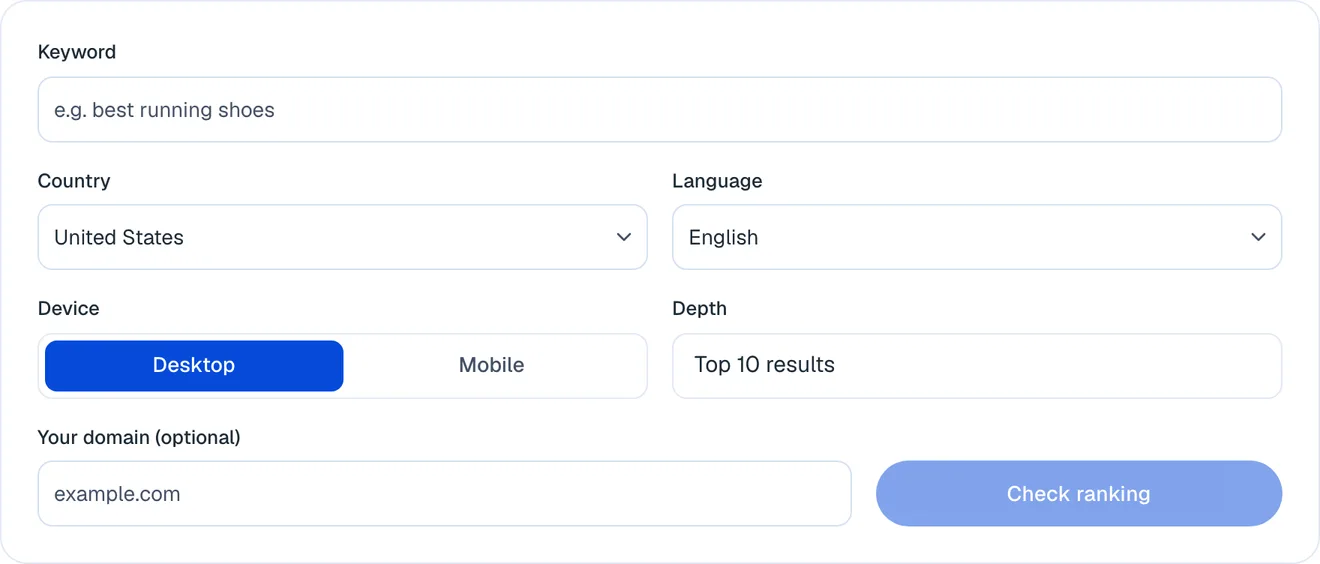
Enter your keyword: Type the query you want to check. No account is needed.
Pick the exact market: Choose the country, language and device (desktop or mobile) your audience searches from, and how deep into the results to look, up to the top 100.
Add your domain and check: Enter your domain and run the check. The tool fetches the live results, shows where your domain sits, and lists the pages ranking around it.
If you want to check your organic search ranks in Bing's search engine result pages, SEOmator provides another free tool for it, the free Bing SERP Rank Checker.
📌Pro Tip: Note the exact settings behind every check: country, language, device and depth. A position is only comparable with another check run the same way.
A spot check answers "where am I today?". For a trend, the SEOmator rank tracker monitors a fixed keyword list over time, charts your positions against competitors, and archives the full results page behind each tracked keyword, including AI Overviews.
2. Google Search Console
Google Search Console (GSC) is one of the essential tools to keep an eye on your SEO health and organic rankings. You can track your website's visibility, click-through rates (CTRs), and indexation issues. Here is how to do it:
Set Up Your Account: First, you need to set up your GSC account and verify your website.
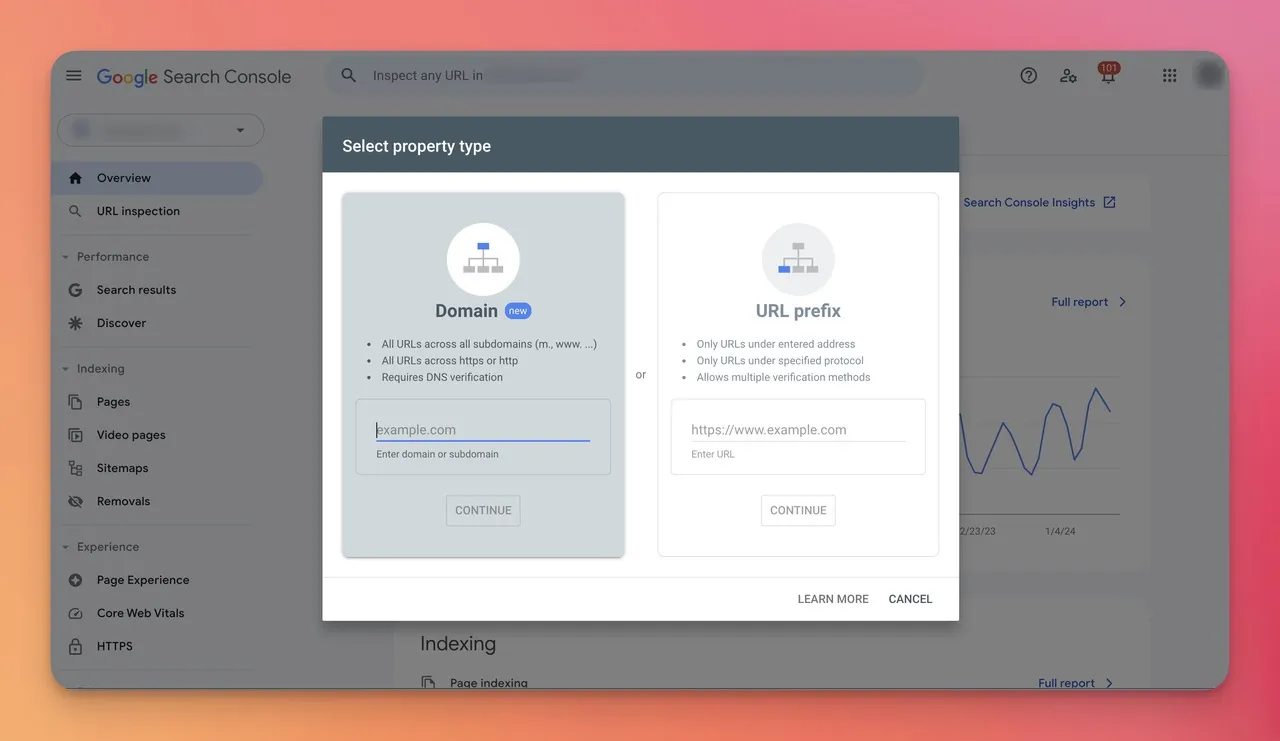
Open the Performance report: In the left menu, go to Performance, then Search results. Turn on the Average position metric alongside clicks, impressions and CTR.
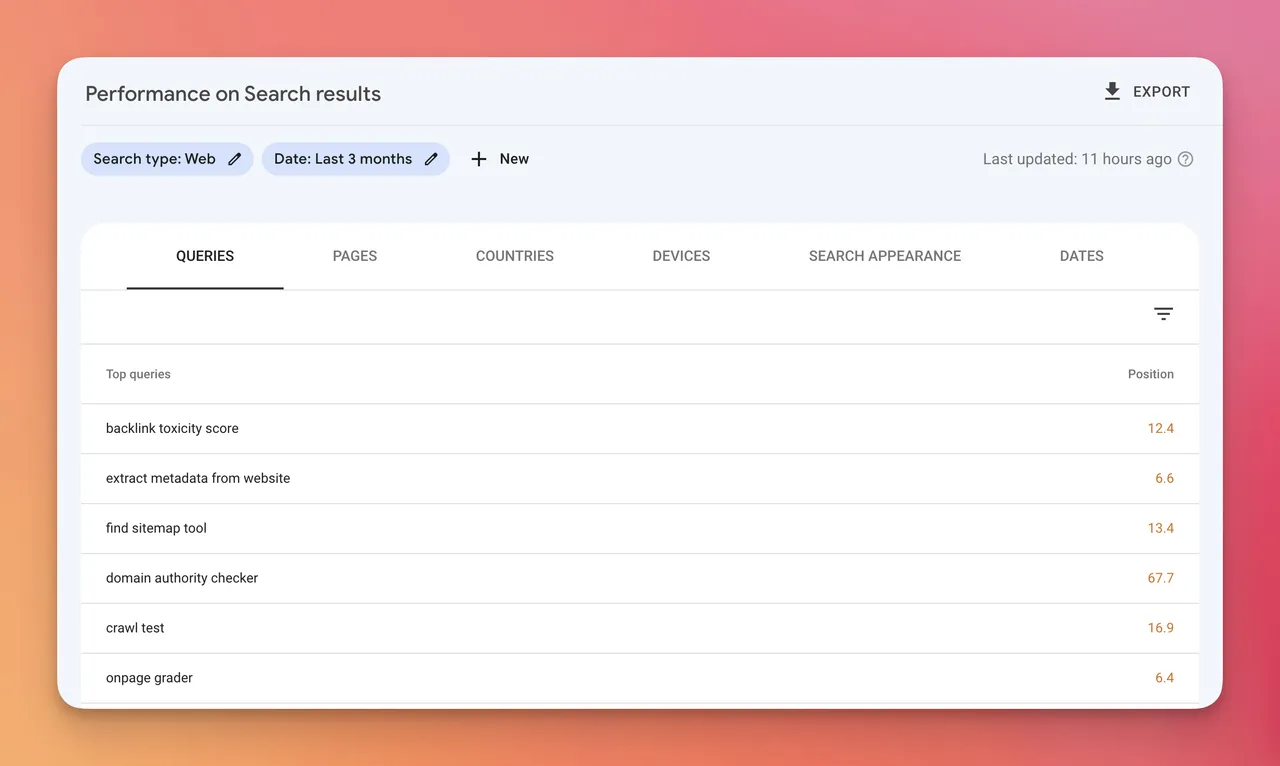
Analyze Your Keywords: The Queries tab lists your top keywords with their average positions. Filter by Country and Device before you read a position, because the unfiltered number blends every market together (more on that below).
⚠️Common Mistake: Treating Search Console's average position as your ranking. Google says it "averages the position value for all impressions", across every country, device and search. It's a trend line, not the spot you'd see in a browser.
3. Google Analytics 4
Google Search Console and Google Analytics, when paired, show how organic rankings turn into visits and engagement.
Link Your Accounts: In Google Analytics, go to Admin, then Search Console links, and link your Search Console property to your web data stream.
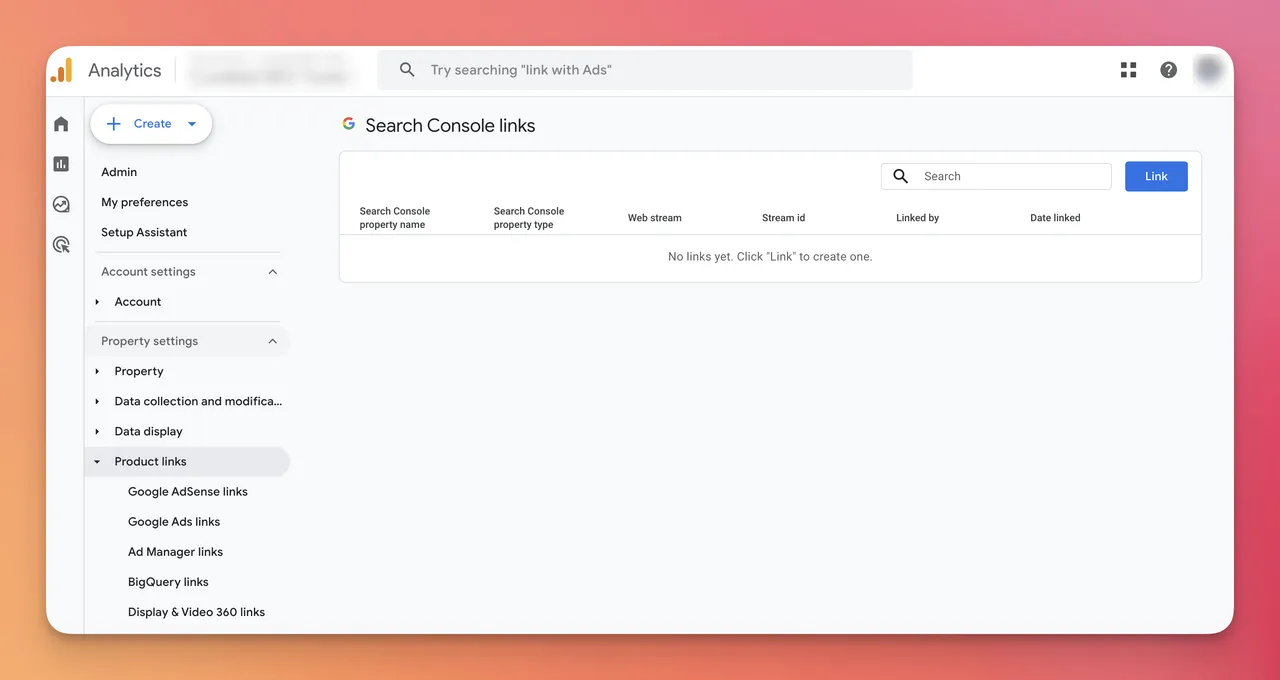
Publish the reports: Google notes that the Search Console collection "is unpublished by default". Open Library in the left navigation and publish it, and the Queries and Google organic search traffic reports appear under Reports.
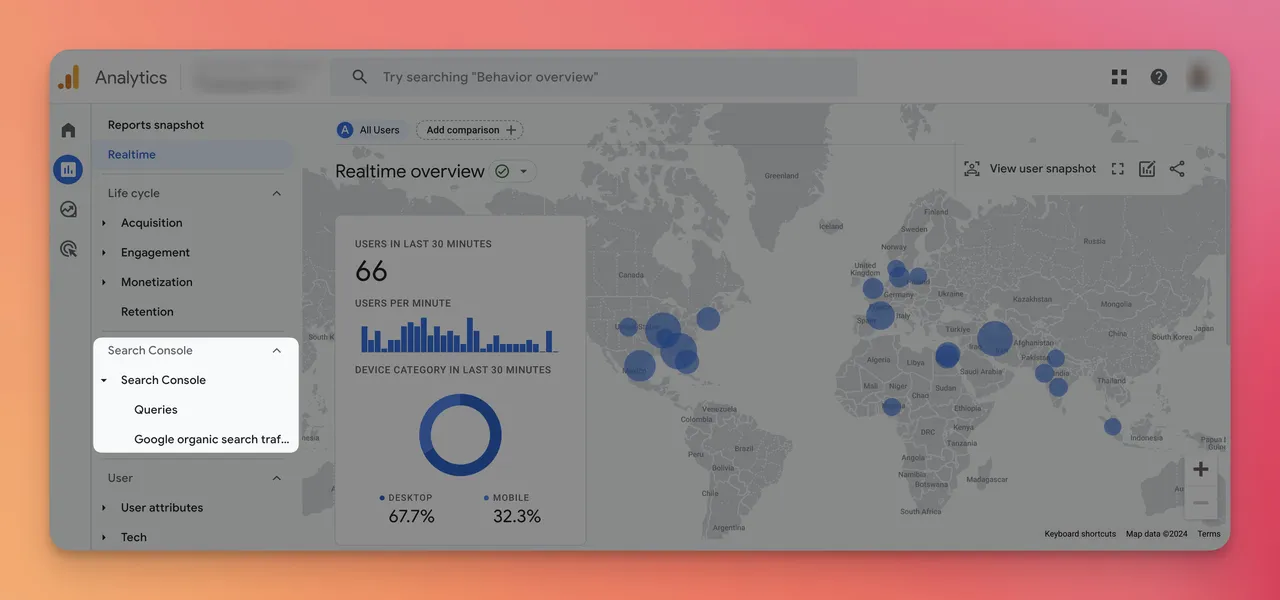
Evaluate Your Data: Analyze this data to see which landing pages earn organic clicks and how those visitors engage. Search Console data arrives in Analytics about 48 hours after Search Console collects it.
4. Google Business Profile
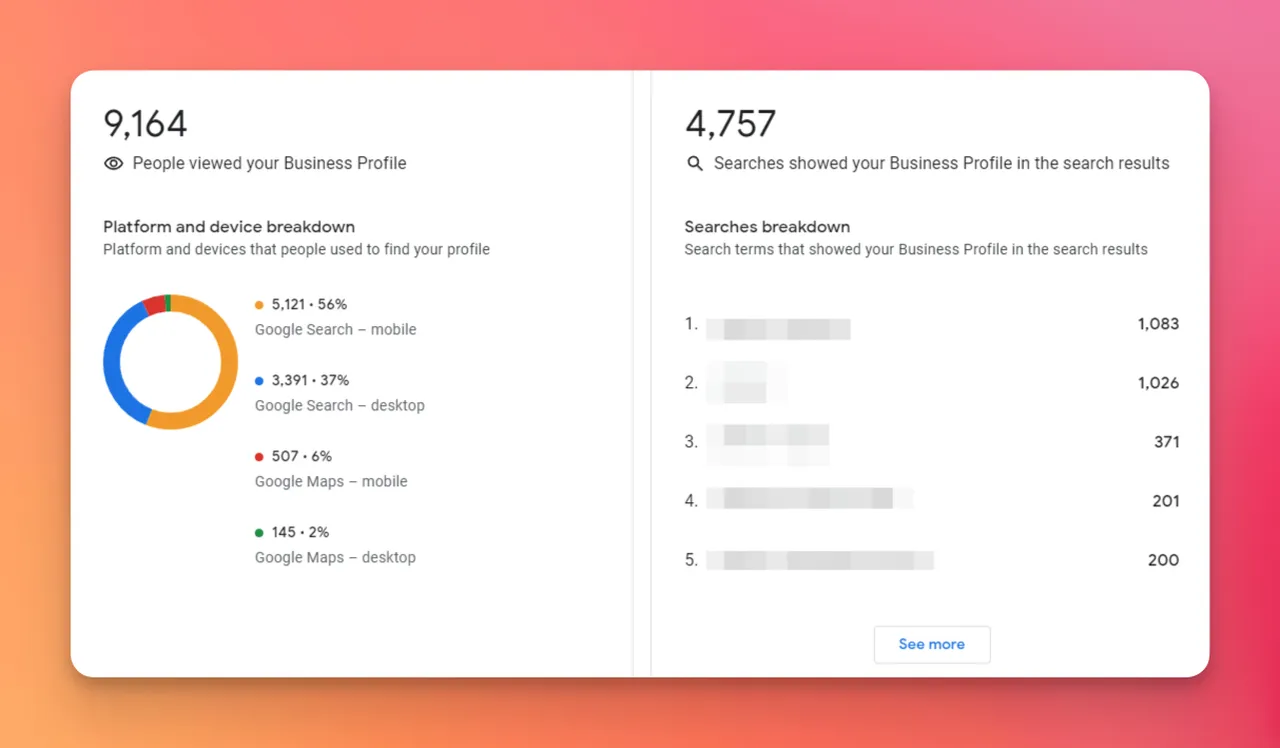
For local businesses, Google Business Profile, renamed from Google My Business in November 2021, is where local visibility shows up. It doesn't report a ranking position, but it shows how people find your business in Search and Maps. Here's how to use it:
Create a 'Google Business Profile' Account: Sign up and fill out your business's information accurately.
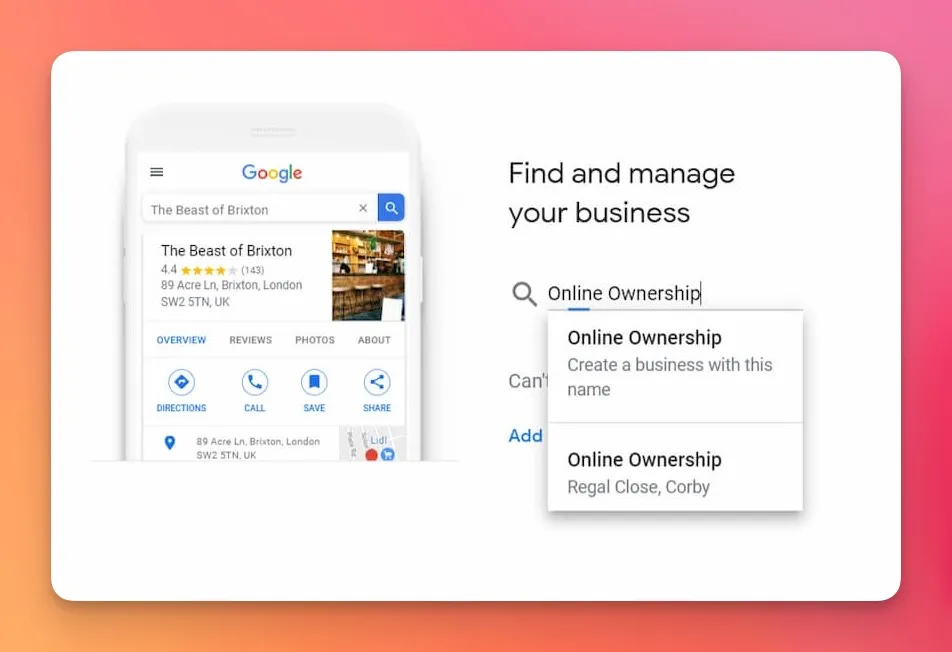
Verify Your Listing: Google needs to trust that your business is legal and exists where it says it does. Therefore, go through their verification process.
Monitor Performance: Regularly review the Performance data in your profile. It shows the searches people used to find you, how many viewed your profile, and how they interacted with your listing.
👉 You may want to read: How to audit a Google Business Profile
5. Matomo
Matomo is one of the most popular privacy-focused website analytics tools. On its own it measures visits, not rankings; to see keyword positions inside it, add its Search Engine Keywords Performance plugin, which imports keyword data from Google Search Console, Bing Webmaster Tools and Yandex.
Monitor Your Data: With the plugin connected, Matomo shows your search keywords next to visits and goals, so you can see which rankings bring valuable visitors, not just traffic.
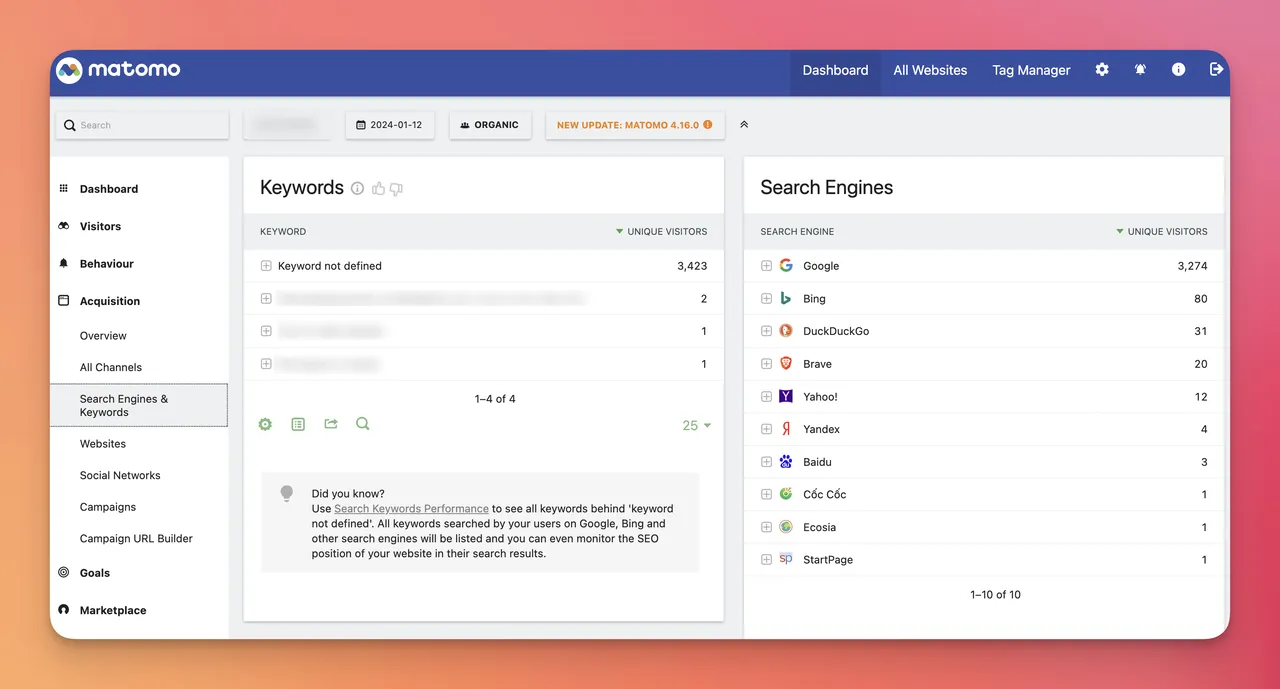
Customize: Matomo offers a range of customizable options that let you tailor dashboards, reports, or metrics. Use these to better cater to your unique needs and goals.
Why Search Console and rank trackers disagree
Search Console and a rank tracker measure different things. Search Console averages your position over every impression, in every country and on every device. A rank tracker checks one location, one device and one moment. Both are correct; they're answering different questions.
We measured the gap on our own site. We took seomator.com's non-branded queries from Search Console (27 August to 23 September 2026) and checked each one live on US desktop Google on 26 September 2026, down to the top 30:
- 81 of 89 queries were in the live US top 30.
- The median gap between the live US position and Search Console's average was 4.9 positions.
- Only 25 of the 81 (30.9%) were within two positions of each other.
- The live US position was more than three places better on 37 queries, and more than three places worse on 14.
📊By the Numbers: For 81 of seomator.com's non-branded queries, one live US desktop check sat a median 4.9 positions away from Search Console's average (checked 26 September 2026). Only 30.9% were within two positions.
The biggest reason is geography. Here's the same query checked from four countries on the same day:
| Query | GSC avg | US | India | UK | Pakistan |
|---|
| serp rank checker | 15.9 | 14 | 3 | 19 | 12 |
| da checker | 13.1 | 17 | 6 | 17 | 11 |
| domain authority checker | 20.4 | 15 | 9 | 24 | 13 |
| seo audit | 13.9 | 4 | 9 | 8 | 10 |
| page speed test | 9.7 | 12 | 9 | 19 | 8 |
Source: SEOmator's own Search Console data for seomator.com (average position, 27 August to 23 September 2026) and live desktop Google checks of the top 30 organic results per country, run 26 September 2026. Brand and competitor-brand queries excluded. One check per query and country, so treat single positions as snapshots.
"serp rank checker" ranks third in India and nineteenth in the UK, and Search Console folds both into 15.9. Neither number is wrong, but only one of them describes the market you sell to.
🔑Key Takeaway: Set your rank tracker to the country and device your customers use, filter Search Console the same way, and compare each tool with itself over time rather than with the other.
Check how deep your tracker looks, too. In September 2025, Google stopped honouring the &num=100 parameter that let tools fetch 100 results in one request, so trackers now read results a page at a time, and some cut their depth. A keyword sitting at position 35 is invisible to a tracker that stops at 20.
How to Set Up Rank Monitoring in 5 Steps
Tracking rank properly means knowing where your pages sit for the keywords that matter, in the market that matters. A plethora of factors, including location, device and search history, influence what any one person sees, and algorithm changes add to the movement.
With a well-structured process and the right tools, you can still get a reliable picture. Here's how to set it up in five steps:
Step 1: Identify Keywords to Track
The first step is identifying the keywords central to your website's offerings. These can range from short-tail to long-tail keywords, and from generic to highly specific terms.
If your business sells handmade candles, your list might include keywords such as 'handmade candles', 'organic wax candles', 'hand-poured scented candles', and 'biodegradable pillar candles.'
👉 You may want to read: How to Find Niche Keywords in 7 Steps
Step 2: Monitor Keyword Rankings
This is where rank tracking tools come into play. Set up your keywords in a tracking tool, with the country, language and device fixed to your target market. These tools show where you rank for these terms and how your positions move over time. If you are still choosing one, we compare ten of them in our guide to the best rank tracking software.
🚩Red Flag: Checking your rank by searching for yourself in your own browser. Google tailors results to your location and history, so the one ranking you see every day is the least reliable one you have.
Step 3: Monitor Search Traffic
Rankings only matter if they bring visitors. Check how much organic traffic each tracked keyword and landing page brings, in Search Console or in Google Analytics once the two are linked.
Step 4: Incorporate Click-Through-Rate (CTR)
An essential metric to factor in is the click-through rate (CTR): the percentage of people who click your result after seeing it. The higher the position, the higher the expected CTR, so a page whose CTR is low for its position usually needs a better title or description.
Step 5: Review on a Fixed Schedule
Combine the three signals on a regular cadence, weekly for most sites. A good ranking with strong organic traffic and a healthy CTR signals success; a good ranking with weak CTR points to the snippet; falling traffic with a stable ranking often points to a new SERP feature taking the clicks.
What's Changing in Organic Ranking

SEO is nowhere near static, and a few changes affect what rank monitoring means today.
1. AI Overviews and AI Mode: Google now answers many queries with an AI-generated summary above the organic results, and AI Mode answers them in a chat. A top-three ranking can still lose clicks to that answer, so monitor whether your pages are cited in it as well as where they rank. You can check which of your keywords trigger AI Overviews and test your visibility in Google AI Mode.
2. Mobile-first Indexing: Google predominantly uses the mobile version of your content for indexing and ranking. Craft a mobile-optimized website, and track mobile rankings separately from desktop.
3. E-E-A-T Principle: Google's E-E-A-T (Experience, Expertise, Authoritativeness, and Trustworthiness) is a core part of their Quality Raters' Guidelines. Websites that demonstrate it could potentially experience improved organic visibility.
4. Helpful Content: Helpful, engaging, and quality content will continue to reign supreme. Google now folds its helpful-content signals into its core ranking systems, so focus on content that resonates with your audience and solves their problem.
5. Page Experience: Page experience includes Core Web Vitals, which measure loading speed, responsiveness (Interaction to Next Paint, which replaced First Input Delay in 2024), and visual stability as the content loads. Improving them can give you an advantage over competitors in SERPs.
6. Tracking Depth: Since Google stopped returning 100 results per request in 2025, deep rank tracking costs tools more to run. Know how deep yours looks before you trust a "not ranking" result.
👉 You may want to read: How to Fix 'Crawled-Currently Not Indexed' Issue
💡Quick Insight: If your traffic falls while your rankings hold steady, look at the results page before you look at your site. A new AI Overview or People Also Ask box above you can take the clicks without moving your position at all.
Conclusion
Monitoring your organic rankings helps you identify prevailing trends and patterns within your niche and offers valuable feedback on your SEO efforts. It helps to understand what's working and what isn't. Using this knowledge, you can fine-tune your SEO strategy, maximizing relevance and effectiveness.
Therefore, once you launch your SEO campaign, you should monitor its impact on your organic rankings. If you're not seeing the desired outcome, you can tweak your strategies and reassess.
When deciding what to monitor, focus on essential keywords, landing pages, and target audience. Use a rank tracker set to your market for positions, and Search Console for the averaged view and the clicks.
Regardless of the tools you choose, remember that they're aids. The value lies in reading them consistently: the same keywords, the same market, the same schedule. If one tool's number jumps, check it against its own history before you compare it with anything else.
Frequently Asked Questions
How do I check my ranking on Google?
For one keyword right now, use a live SERP checker such as SEOmator's free Google SERP Rank Checker, set to your country and device. For a trend across many keywords, use a rank tracker. Google Search Console shows your average position per query, but that averages every country and device, so filter it first.
Yes. SEOmator's free Google and Bing SERP rank checkers show a live position for any keyword and domain, with country, language, device and depth settings. Google Search Console is also free and shows average positions for every query your site appears for.
Why is my Search Console position different from my rank tracker?
Search Console averages your position across every impression, country and device, while a rank tracker checks one location and device at one moment. On our own site, the two differed by a median of 4.9 positions across 81 queries. Filter Search Console by country and device to bring them closer.
What is a good SEO ranking?
Positions one to three earn most of the clicks, and anything on the first page is visible to most searchers. In practice, a good ranking is one that brings qualified visitors: a position-four ranking for a keyword your customers use is worth more than a first place for a query nobody buys from.
How often should I check my organic rankings?
Weekly is enough for most sites, because single-day movements are mostly noise. Check daily only for your most valuable keywords or during a site migration, when you need to catch a drop quickly.
👉 Related Articles:
- How to Search Keywords on a Website
- How to Add a User to Google Search Console
- Website Migration: Your Ultimate Checklist and Guide